I try to make sure I get the latest version of the MVPS HOSTS file installed on all of our PCs. It seems now to be published about every 5 weeks, and the latest was made available on January 24.
"Yet another end is nigh for Windows 7. After months of buildup—Microsoft
killed standalone software sales of the operating system in October
2013, and Windows 7 consumer PCs stopped being manufactured in October 2014—the
venerable OS is finally exiting “mainstream support” on January 13,
2015. And for months now, the Web has been flooded with a wave of
confused or downright fearmongering headlines and articles implying that Windows 7 is following Windows XP into the graveyard.
It's not.
The confusion here stems from Microsoft's maddeningly obtuse naming
conventions. Leaving mainstream support only means that Windows 7 won't
be receiving any new features or product tweaks, such as the impressing-sounding DirectX 12 gaming technology slated to launch with Windows 10. You won't be able to call Microsoft for free help if you run into an issue with Windows 7 either.
Once a Windows desktop operating system leaves mainstream support, it
enters the extended support phase—the very same support phase that
Windows XP found itself in from early 2009 until its death earlier this
year.
You'll still receive those oh-so-critical security patches during
extended support, meaning that while Windows 7 won't be in active
development beyond next January, it won't be tossed to the wolves of the
Web, either. Hotfixes
will still be provided, too, assuming they're security related.
(Business can sign up for an extended hotfix support plan if your
company wants hotfix support for non-security issues.) And those
security updates will be coming for a long time, too: Extended support
for Windows 7 lasts until January 14, 2020. Heck, commercial PCs with
Windows 7 Professional will even continue to be sold for the foreseeable future."
"Another day, another hack. This one isn't cut and dry, though. The
notorious hacker group Anonymous released 13,000 passwords on the
Internet recently and claimed they came from several popular online
stores and sites, including Amazon and Walmart.
But, not everyone is so sure the hack is real. In fact, Walmart has
denied the claims outright and others think it might be a
hoax. Anonymous posted the file to a file sharing site called Ghostbin.
The group also claims that it posted a copy of the controversial movie "The Interview" for users to download.
The file also included the accounts of a
number of dating and porn sites, and it appears to have some passwords
for a popular security program known as CyberGhost, which protects you
from a hacker snooping on you when you use public WiFi hotspots.
Allegedly, the passwords come from Amazon, Dell, Hulu Plus,
Origin.com, PlayStation, Shutterstock, Twitch.tv, Walmart and Xbox Live.
Just in case the hack is real, there are some security precautions you
should take.
While many think the hack is hoax, you should still make sure your
accounts are safe just in case. If you have an account on any of the
sites possibly affected by the supposed hack, just go in to your account
and change your password. That way, if the hack is real, the stolen
password will be outdated.
Changing your password is a simple way to make sure your account is
secure. Sadly, nowadays we have to take every hacking threat seriously -
even when many think it's nothing more than a hoax."
If you are serious about keeping your computer secure, you need a HOSTS file. The one that comes pre-loaded on any Windows system is empty and does us absolutely no good. Fortunately there is a man who updates and makes available at no charge, a monthly updates loaded HOSTS file. (He does accept contributions!)
Over the course of the life of this blog I have spoken of it very often. Once I created a series of 5 blog posts containing everything one needs to know about what a HOSTS file is, how to get it, and how to install it.
The author of the MVPS HOSTS file has kept everything in place so that his file can be loaded and used in every Windows operating system. I have it loaded, and I download and install the monthly updated file, on my XP, W7, and W8 systems.
If you feel uncomfortable doing this, you can follow my older series of 5 blog posts to give you much more detail. Since I recently deleted Spybot from my security baseline, and if you do the same, you can ignore anything contained in these 5 steps that has to do with Spybot.
Here is a link to the first of the 5 posts. After reading the first one you can use the search box at the top of this page to find #2, and then #3, and so on.
This is an update to my security baseline. The biggest change is that I have dropped good old Spybot from the list. I never got to like their newer versions and they stopped providing updates to the older version. If you still have version 1.6 be aware that you have not been given updated information in many months, and running the old is probably not doing any good.
Also, and this is very new news, I have upgraded my copy of Malwarebytes to the Premium version. At a price of $24.95 which covers 3 machine installations, I felt the realtime option, available only in Premium, was worth the small expense. Will I upgrade in a year to the newer version as it becomes available? That remains to be seen.
Our home hardware profile has also changed. We now have 2 Windows 8.1 Dell laptops and one Windows 7 desktop. These are the 3 machines we run the Premium Malwarebytes on. Although we still have 2 Windows XP machines, these still run but are not used as regular "production" machines. On these I still run MSE and the free version of Malwarebytes.
1. My anti-virus program of choice is the free Microsoft Security Essentials (MSE) aka Windows Defender in Windows 8 & 8.1. This is a very impressive anti-virus program and can replace any you have now. DOWNLOAD HERE
2. Windows Firewall (Standard part of your operating system. Check the Security Center to be sure it is on.)
3. MVPS HOSTS File - download the current month's version and update monthly DOWNLOAD HERE
4. CCleaner - free version - check for newer version than you may already have. Run weekly. DOWNLOAD HERE by clicking on Download Latest Version in the upper right hand corner of the page.
5. Malwarebytes' Anti-Malware - run bi-weekly. DOWNLOAD HERE As noted above I run the Premium version, but the free version is still excellent.
6. SuperAntiSpyware Free Edition - run bi-weekly in the off week after #5. DOWNLOAD HERE
I will be happy to assist you with any or all of the above installations. This can be done remotely.
Questions? Comment below or write me, pcdoc at brpcdoc dot com
Today I took the plunge and bought Malwarebytes Anti-Malware Premium. Those of you who know me know that I am loathe to pay for software, preferring to use the free, less featured program.
I have been using Malwarebytes Anti-Malware free version for years. I think it is the best of its kind hands down. So why did I make the switch to the fee-based premium version? I think I made the decision for 2 reasons: realtime monitoring of my systems, and the price is a dramatically low $24.95 for one year, and that one license covers 3 systems, and that is exactly how many production systems we have in our house. So for a little over $8 I can get the realtime monitoring and all of the other bells and whistles that come with the premium version on all of our machines.
Security today, it goes without saying, is a red hot topic, and I want to do all I can do to make our systems secure. So there you have it in a nutshell: great protection at a very affordable price.
You should consider doing this too.
FYI, we have 2 Windows 8.1 and one Windows 7 machines in the house. The Windows 7 machine runs Microsoft Security Essentials for its anti-virus protection, and the 2 Windows 8.1 machines use Windows Defender for their anti-virus protection (for the uninitiated, Windows Defender in Windows 8 is the new name for Microsoft Security Essentials).
It is really hard to keep up a blog like this one, and I have not been giving it the time and effort needed to keep it going. Apologies.
I am going to take a rest. Yes, I have my health and I am doing fine. It's just that priorities change. I may or may not be back to this blog. I'm not sure, but I have my doubts.
Finally Kim Komando agrees with me! :-) No, but seriously, I have
been recommending Malwarebytes as a free tool to clean up malware on
your system. It is one excellent tool and normally the first thing I run
on YOUR systems when you ask me to clean your system.
As
Kim points out, it is a passive tool. This means you have to run it.
Unlike your anti-virus program which is active and always looking out
for bad stuff, you take control with this tool. Please note that
Malwarebytes does have a fee-based tool as well, and this is an active
tool. If you don't mind spending the money go for it!
For
the time being I am using the free version, the one I have been
recommending all these years. It is an excellent tool. Kim recommends
running this once a month. I recommend every 2 weeks. I am considering buying the fee-based version.
Okay, I will admit I absolutely love Verizon FIOS. I quit them, oh maybe a year ago and switched to Comcast. Why? My Verizon Triple Play prices got out of control and I was up to nearly $200 a month! CRAZY!
So, as I said, I switched to Comcast. It was a disaster. Their internet speeds simply cannot compare to FIOS.
So there I have said it. I love Verizon FIOS.
I received a note from Verizon a few days ago and included in the note was this sentence: "We love having you in the FiOS community and as a member of My Rewards+. To show our appreciation, we upgraded your Internet upload speed to match your download speed—for free. This upgrade is just one more great benefit of being a member of My Rewards+."
I have to say that was nice to read, but I was paying for, and getting, 50 MBPS download and 30 MBPS upload. I didn't really feel I needed the extra upload speed, but it was free and automatic, so I got it.
I just ran a speedtest.net and look what I got (below). AMAZING results. THANK YOU Verizon!
Oh, by the way, when I came back to Verizon recently. leaving Comcast behind, I carefully crafted my package to favor internet and downplayed the TV and also eliminated the landline (more on that later in a separate post).
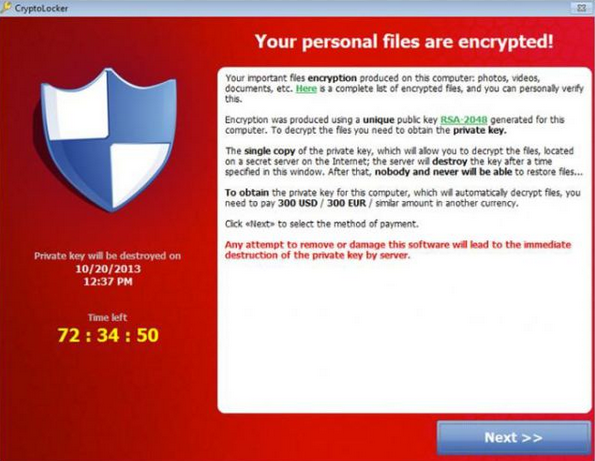
"Until today, Microsoft Windows users who’ve
been unfortunate enough to have the personal files on their computer
encrypted and held for ransom by a nasty strain of malware called CryptoLocker
have been faced with a tough choice: Pay cybercrooks a ransom of a few
hundred to several thousand dollars to unlock the files, or kiss those
files goodbye forever. That changed this morning, when two security
firms teamed up to launch a free new online service that can help
victims unlock and recover files scrambled by the malware.
First
spotted in September 2013, CryptoLocker is a prolific and very damaging
strain of malware that uses strong encryption to lock files that are
likely to be the most valued by victim users, including Microsoft Office
documents, photos, and MP3 files.
Infected machines typically display a warning that the victim’s files
have been locked and can only be decrypted by sending a certain
fraction or number of Bitcoins to a decryption service run by the
perpetrators. Victims are given 72 hours to pay the ransom — typically a
few hundred dollars worth of Bitcoins — after which time the ransom demand increases fivefold or more.
But early Wednesday morning, two security firms – Milpitas, Calf. based FireEye and Fox-IT in the Netherlands — launched decryptcryptolocker.com,
a site that victims can use to recover their files. Victims need to
provide an email address and upload just one of the encrypted files from
their computer, and the service will email a link that victims can use
to download a recovery program to decrypt all of their scrambled files.
The free decryption service was made possible because Fox-IT was
somehow able to recover the private keys that the cybercriminals who
were running the CryptoLocker scam used on their own (not free)
decryption service. Neither company is disclosing much about how exactly
those keys were recovered other than to say that the opportunity arose
as the crooks were attempting to recover from Operation Tovar, an international effort in June that sought to dismantle the infrastructure that CryptoLocker used to infect PCs."
"Russian criminals have stolen more than 1.2 billion Internet
usernames and passwords, and the odds are decent that some of yours
might be among them.
There's no need to panic at this point -- Hold Security, the firm that discovered the theft,
says the gang isn't in the business of stealing your bank account
information. Instead, they make their money by sending out spam for
bogus products like weight-loss pills.
That means you need to
stay on your guard. If you see strange messages being sent from your
email or social media accounts, you might be among those affected.
Here are a few things you can do to protect yourself:
Change your passwords and make them smart: When
it comes important services, including email, banking and social media,
you'll want to change those passwords. As a rule, create different
passwords for different services,and change them every six months or so.
There's a lot of debate about what makes for the best
password. Some experts recommend using a password manager -- a single
service that you log into which then generates random passcodes for all
your accounts.
But the danger with password managers is that they create a single point of failure: if the password manager itself is compromised, all your accounts become vulnerable.
Another solution is to use long sentences or phrases. The more
characters you add to a password, the more difficult it is for a
computer program to crack -- even if your password is a simple sentence
that's easy to remember ("I Need 2 Spend Less Time On Social Media")."