Thursday, September 16, 2010

MSE - Microsoft Security Essentials - GET ON BOARD!

Here is more affirmation that my recommendation for Microsoft Security Essentials is a sound one. If you are not using MSE, I suggest you convert now. If you are using a fee-based antivirus product, start saving money. MSE is free. If you are using my old recommended product, AVG Free, I can assure you that MSE works better, has less overhead, and will not pressure you to upgrade to a fee version, as AVG does.

The following is just the header info from an article in the Windows Secrets Newsletter.


Security Essentials test drive — month 6
Fred Langa
By Fred Langa

After half a year of real-life testing, Microsoft's Security Essentials anti-malware application is batting 1.000.

All nine test computers — a mix of Windows 7, Vista and XP systems (including two portables with 20,000 miles of travel) — remain malware- and virus-free.

Wednesday, September 15, 2010

Windows Updates and MSRT

I noticed that I had 8 updates applied to my system overnight, and included was the monthly version of Microsoft's Malicious Software Removal Tool (MSRT). Windows Update is a little different in Windows 7. It has a new look and is done outside of Internet Explorer. This is what my history looks like for last night (click for larger image):


As has become my custom, I ran a standalone Full Scan of MSRT. You can do this by clicking on START/RUN/MRT/OK. (yes, MRT is correct. Don't ask me why!)

Be sure that the MSRT window indicates that it is the September 2010 version (in the upper right corner of the window). My full scan ran for over 3 hours, but didn't keep me from running other things and I feel good afterwards for having run it. I consider it a worthwhile monthly exercise.

Monday, September 13, 2010

Google Chrome

I have made no secret of the fact that I am a big Google fan. However, I continue to be disappointed in their browser offering, Google Chrome. I have downloaded the latest version, 6.0.472.55 beta, and find that it STILL does not offer a left side of the screen sidebar display of Favorites or Bookmarks, as does every other browser I have ever tried. I don't understand why they don't, and find the product unusable - to me anyway - without that capability.

Today I have uninstalled it, as I have every other earlier version I tried. Get with it Google!

Friday, September 10, 2010

Google Instant: The Pros and Cons

You have probably heard of Google Instant, announced a few days ago. I have played with it quite a bit and am somewhat impressed. I suppose it will become a way of life for all of us and will prove, in time, to be a worthwhile enhancement that will save us time and make us more productive. This PCWorld article covers the pros and the cons of Instant.

Google Instant: The Pros and Cons

Thursday, September 9, 2010

MSE Lookalike Rogue Program

If you use Microsoft Security Essentials (MSE) as your antivirus program, as I do on all of my machines, you should be aware and alert to the fact that there is a new rogue program that imitates MSE. It would be easy to fall for it if you were not aware of this.

Please take a look at this blog post by Bharath M Narayan to get a feel for what the rogue looks like and what it will do if you are not careful.

Monday, September 6, 2010

MY LUCKY DAY!

Hard to believe that people fall for these phishing scams. The abuse of the English language seems to be common in these and might be your first clue!

Be careful out there!

-------Original Message-------
From: Mrs.Veronica Edward
To: undisclosed-recipients@
Subject: OFFICIAL WINNING NOTIFICATION, YOUR EMAIL ID HAS WON
Sent: 06 Sep '10 08:46
--

Microsoft Corporations:
Customer Service
Your Reference No: AHI-L/200-AHI
Your Batch No: 2689/DOL/220042

OFFICIAL WINNING NOTIFICATION.

We are pleased to inform you of the release of the long awaited results of
Sweepstakes promotion organized by Microsoft, in conjunction with the
foundation for the promotion of software products, (F.P.S.) held this
September
2010 in NETHERLANS, Where in your email address emerged as one of the
online Winning emails in the 2nd category and therefore attracted a cash
award of 350,000.00 (Three Hundred and Fifty Thousand Euros) and a Toshiba
Laptop.
To begin your claim, do file for the release of your winning by contacting6
our Foreign Transfer Manager:

Mr. Eddie Wilcox
Tel:0031-616-861-394
Fax:0031-911-820-142
Email:winners_microaward@ozu.es

The Microsoft Internet E-mail lottery Awards is sponsored by our
CEO/Chairman, Bill Gates and a consortium of software promotion companies.
The Intel Group, Toshiba, Dell Computers and other International Companies.
The Microsoft Internet E-mail draw is held periodically and is organized to
encourage the use of the Internet and promote computer literacy worldwide.

Congratulations!!

Sincerely,

Mrs.Veronica Edward,
Promotions Manager.

Thursday, September 2, 2010

Rethinking Backups

I chose last night to do backups of my data on my primary machine. I have nearly 90GB of documents, pictures, music, video, e-mail, bookmarks/favorites, and my desktop. I copy all of this, usually on a quarterly basis, to my MyBook 1TB external drive connected via a USB cable.

When I started the copy I was informed that the operation would take 135 minutes, and that, of course, is just the first SWAG of an estimate made by Windows Explorer. What it really took I don't know because I left it and went to bed. Fortunately the operation completed successfully, and did not get hung on on some issue, as can happen from time to time. So when I awoke today I had successfully completed backing up all 90GB.

The data went into a new folder I named MY DATA FROM WINDOWS 7 LAPTOP BACKED UP ON 9-1-2010. I have several such folders which are now getting close to filling up the 1TB. Soon I shall have to free up some space and will go and delete the oldest backup to do that. And so it goes.

I think I shall be giving some thought to finding an alternate and better way to back up all of this data. It would be very nice to have it stored at an off site location where I would be able to access it from anywhere, but then I'd have to pare down the amount of data if I wanted an affordable solution.

I'll let you know what I come up with, if anything, but I don't expect to do that soon. Right now I am feeling pretty good knowing I have a complete backup of all of my data. I hope you are enjoying that same feeling.

Wednesday, September 1, 2010

Update on new rogue programs

If you go to this web site, note  that everything on the page you go to is new! I was amazed to see how many new rogues were found in the month of August.

You should scroll through them all just to get the idea of what they look like so that should you run into one you will know it is a fake and you can react accordingly.

Note there is even a fake MSRT this month! Pretty clever.

Keep your antivirus up to date. I hope most of you are now using Microsoft Security Essentials (MSE). MSE appears to be a very serious product, and like most everything else I recommend, it is free.

Run Malwarebytes' Anti-Malware, Superantispyware, and Spybot regularly, and be sure you get the current month's HOSTS file in place.

Bharath's Security Blog

Monday, August 30, 2010

1-in-4 worms spread through infected USB devices

This one caught my eye. I find it hard to believe, but there it is. It would be wise to run a virus scan and malware scan on your thumb drives just to be sure they are clean. I'd add checking thumb drives to your regular security checks as well.

The article is on the computerworld.com web site at

1-in-4 worms spread through infected USB devices

Friday, August 27, 2010

What is the best Web browser?

This is from Kim Komando's web site, http://www.komando.com/.

It is presented below as written, with no changes. FYI, I prefer and still recommend Firefox. I have tried Chrome with each new release that comes along, but until/unless it implements a Bookmarks sidebar, like every other browser has, I just won't use it. It takes very little time to download it, install it, test it, and then uninstall it. I have done that many times!

Here is Kim's post:

"The browser world used to be simple. Basically, everyone used Internet Explorer (IE). If you wanted to be different, you could use Netscape. Or you could try Opera, if you knew it existed. And that was about it.

Now we have IE, Firefox, Chrome, Opera and Safari. And those are just the major ones. Which do you choose?

I'm going to focus on the top three market-share contenders. That would be IE8, Firefox and Chrome, respectively. Opera is excellent, but still a niche program. And Safari works better on the Mac than on PCs. I'll briefly discuss each browser's defining features, security and basic competence.

According to Net Applications, which surveys browser usage, IE was No. 1 in February. It had 62 percent of the market. Firefox was second with 24 percent. Chrome, Safari and Opera trailed, with 6, 4 and 2 percent, respectively.

Browsers are becoming homogenized. As time passes, they incorporate similar features to compete. If nothing drastic happens, they'll all be the same within a couple years. So, choose a browser with short term benefits foremost in mind. And don’t be afraid to switch.

Microsoft Internet Explorer

Everyone knows about Internet Explorer. It's installed on every Windows computer by default. Until a few years ago, it was synonymous with the Internet. Now it is losing market share.
IE has no real advantages compared to other browsers. The latest version, IE8, is basically playing catch-up. It is often slower than other browsers and sometimes displays Web sites incorrectly. It also uses system resources heavily. However, users may not always notice these problems.

The entire IE line is plagued with security issues. IE8 is better than 6 or 7, but still not great. If you're using IE, upgrade to IE8.

Microsoft has been showing IE9, and it looks promising. A serious attempt is being made to create a good browser. I'll be sure to let you know how it turns out.

For now, I would ditch IE. Switching to a new browser is easy and free. You can even transfer all your bookmarks and settings with no hassle.

Mozilla Firefox

My long-standing browser recommendation is Mozilla's Firefox. It started the current browser wars after its debut five years ago. It is a descendent of IE's old rival, Netscape. Like all other browsers, it's free.

Firefox was originally designed for speed and simplicity. It is faster than IE and better conforms to Web standards. This means it displays most Web sites correctly.

Firefox is also strong on security. It's obviously not perfect, but the developers are responsive. They fix security problems in a timely manner.

Firefox is highly customizable. You can download add-ons—themes, extensions and plug-ins. Themes are buttons, colors and layouts. Plug-ins are core programs that make Firefox work better. They are usually included in the Firefox download.

Extensions are a particular strength. These are little programs, nearly always free, that add or enhance features. For instance, you can get an extension that pops up reminders. Another verifies the integrity of Web links. There are literally thousands of things you can add.
Mozilla also has regular upgrades. This continually improves Firefox's speed and stability. New features are always being developed.

Google Chrome

Chrome is the newest major browser. It has enjoyed a meteoric rise to prominence in only two years. What else do you expect when it is developed by Google?

Google designed Chrome as a platform for using Web services. That could include Google Search, Google Docs, Gmail and so on. Hmm…Those are all Google products. That's probably just a coincidence!

Chrome is an excellent browser. It's consistently the fastest in browsing tests, although often only by  milliseconds. And it gets a 100 percent in the Acid3 test. That test determines how well a browser complies with Web standards.

By comparison, IE8 gets a 20 percent in the Acid3 test. Firefox comes in at 93 percent.
Chrome is also secure. Like Mozilla, it is responsive to security threats. It even implements security features Firefox doesn't have. This includes a sandbox feature that isolates Web pages from the system. Malicious code can't break out to infect your computer. That's scheduled for Firefox, but hasn't arrived yet.

Chrome's interface is a bit different. It wanted more screen area. So, the interface is minimal and streamlined. It works, but it takes some adjustment.

Where Chrome lags is extensions. Many useful extensions for Firefox aren't available for Chrome. Also, the extension database and installation procedures aren't user-friendly. This is improving, but it's still a consideration.

So, which browser should you choose? Well, I don't recommend Internet Explorer. It has too many security problems. Both Firefox and Chrome are fast and secure. Firefox is customizable; Chrome is simple. If you aren't sure, download and test both. Give Opera a try while you're at it. After all, they're free!

No matter how good your browser, you still need to take security seriously."

Tuesday, August 24, 2010

Thinking of buying a laptop? Read this first

Call That Girl is one of the many web sites I visit frequently. I readily admit that I don't know everything and like to pick up tidbits or pointers elsewhere whenever I can. Lisa has some very good advice in this blog post of hers, and for those of you in the market for a new laptop this post is highly recommended.

Monday, August 23, 2010

Another Norton Bust

Yesterday I had the pleasure of uninstalling another copy of Norton Antivirus and replacing it with Microsoft Security Essentials (MSE), my current favorite, recommended, and FREE antivirus and antispyware product.

This particular customer's machine had been infected by one of the ubiquitous rogue programs. His fully-paid-up Norton license did NOT protect him. This is at least the second time I have seen a customer let down by Norton, and it was my pleasure to download and install and run the Norton Removal Tool (thank you for this one good product Symantec!).

Coincidentally, this customer had recently received a notice that his Norton product would expire in a month, and would he please agree to pay $44 to get it renewed for another year. What gall they have.

If you have not yet made the switch, now's a good time to consider doing it.

Friday, August 20, 2010

Windows 7 is a Success, On Track to Overtake XP This Year

I still like Windows 7. It is easy for an experienced Windows XP user to adapt to its minor changes. Likewise for a Vista user. This article comes from maximumpc.com.

"Over the last year, Windows 7 has slowly, but steadily been gaining market share. Now perhaps we can all just get together and call it a huge success. According to some Google analytics data, Windows 7 has blown by Vista, and should surpass Windows XP by year's end. What we're talking about here are usage statistics for various websites, but this is indicative of what regular consumers are running.

In July, Microsoft announced that they had sold 175 million Windows 7 licenses. That amounts to 30 million per month. Still, when Microsoft talks about this, there's no joy, no self-congratulations. It wouldn't be prudent to talk up the platform too much, but consumers seem pleased with Windows 7. Microsoft has avoided reliving the PR nightmare that the Vista launch turned into.

All the data shows that Vista users are upgrading at an astounding rate. This in and of itself is odd. In the past, most users have just waited until they bought a new computer to get the new version of Windows. It could be a symptom of widespread dissatisfaction with Vista, but the quality of Windows 7 is also getting XP users to take the plunge. Did you step up to Windows 7 from XP? Tell us about your experience."

Wednesday, August 18, 2010

MVPS HOSTS File for August

Remember, this is a very good time to run Spybot - before downloading and updating the HOST file.


MVPS HOSTS File Update August-18-2010

The MVPS HOSTS file was recently updated [August-18-2010]
http://www.mvps.org/winhelp2002/hosts.htm
Download: hosts.zip (149 kb)
http://www.mvps.org/winhelp2002/hosts.zip
How To: Download and Extract the HOSTS file
http://www.mvps.org/winhelp2002/hosts2.htm
HOSTS File - Frequently Asked Questions
http://www.mvps.org/winhelp2002/hostsfaq.htm
Note: the "text" version makes a great resource for determining possible unwanted connections ...
http://www.mvps.org/winhelp2002/hosts.txt (605 kb)

Tuesday, August 17, 2010

15 Things Every PC User Should Know

This is a very useful list of items from pcworld.com. I must say that I am a little disappointed that they didn't include "keep your desktop uncluttered". I work on some PCs that don't have room for another icon! Really. A cluttered desktop will slow down the startup process.

But I digress. Here's the article, worth your time for some good basic advice.

Friday, August 6, 2010

Vacation

I am in Maine and will be here all next week on vacation. I'll probably take the week off from blogging as well. I hope all of you readers are having a good summer. Hard to believe but people are talking "back to school" already.

Thursday, August 5, 2010

Power Outage

I arrived in East Boothbay tonight at 10:45 PM and found that the power was out. My son informed me that power went out around 5 PM. Our cottage was lit by candles. The power came back on at about 11:20. I write this because we have the Time Warner version of their "Triple Play", the bundle that gives us TV, High Speed Internet, and Telephone. I was reminded that the TWC Cable Modem does not have a battery built in for backup. Thus we had no telephone.

I remember back in Vermont that Comcast had an 8 hour battery built in to their Cable Modem. With that one would still be able to make phone calls (in theory a least) with a phone attached to the modem, but I don't think I ever tested that out. Also, I never gave any thought to what kind of phone would work, if any. I guess maybe one of the old handsets. If true it might be a good idea to keep one of them around.

I mention this just as food for thought for all of you. If you are converting to one of the bundles, ask about backup and what else you would have to do to maintain telephone capability in the event of a power failure. I guess a PC directly attached via Cat 5 cable to the modem would work as long as the PC was a laptop running on its own battery.

A simple answer for most of you may be your cell phone, but I always manage to choose places to live that have no cell service available!

Wednesday, August 4, 2010

Tuning your system with the System Configuration Utility (MSCONFIG)

When I wrote up the accompanying document for this post, it was written for Windows XP. However, if you have Vista or Windows 7 you too will find this guide easy to follow and use. If something seems amiss it might be because you are using Vista or W7, but for the most part I think you'll find this guide something you can follow. One big change is that the referenced web site, Castlecops, is no longer available. If you do a Google search for STARTUP PROGRAMS you will find several other good web sites that will serve you well. Here is one: http://www.bleepingcomputer.com/startups/

The System Configuration Utility, an easy to use program in Windows,  will take you one step closer to having a well-tuned Windows system. I use it every time I visit a customer's home or office as a part of my system tune-up process.

Tuesday, August 3, 2010

Cleaning & Tuning

Today was a good day for me. I found enough time to clean and tune my own (primary) machine! Rarely do I get such a luxury. I rely on my recommended security suite (http://pcdocsblog.blogspot.com/2010/02/please-take-heed-and-secure-your-system.html)  to keep my machines safe from rogues and viruses and other malware, and they do a great job. Once a week I try to do a full scan with either Malwarebytes or SuperAntispyware. My MSE antivirus runs every night - a full scan - while I sleep.

But after some time has gone by it is always a good idea to do a focused and thorough cleaning and tuning, and today I did just that. I also reorganized my recent photos. It turns out that I had taken many hundreds of photos during July, so I created some sub-folders to further define the July photos.

Many of you have asked me about how to organize your photos. Here is what my photo library looks like (click on it for larger view):


If you want to know a program you can use to organize your photos, I'd recommend Picasa, but I do mine manually. I like being in control and programs like Picasa and others take that away from you. In those 10 years of photo folders I have 33,495 digital photos, mostly of family, and of course, these are all precious to me, so I back them up regularly. Like most other PC things, I do that myself too.

One thing I don't get to do each week is to run some of the utility programs within Tune-Up Utilities. I freed up disk space, I cleaned the registry, I defragged the registry, checked for broken shortcuts (there were none), ran CCleaner, and did general housekeeping tasks. I feel a lot better having a clean machine that I know is running at its optimum.

As you all know, I am available to perform this service for you if needed, but I take a lot of pride and get great satisfaction knowing that so many of you, who have been following me for years, can do the same for yourselves. It's very comforing knowing what you are doing, right?

Friday, July 30, 2010

Oh Brother!

What clever and devious people do in their spare time!


Hard to believe we have yet another rogue program.

Thursday, July 29, 2010

Bharath's Security Blog

A couple of new rogue programs to watch out for. There is no rest for the weary, although it was over a month since Bharath published the last new rogue. Be careful ou there. They are out to get you!

http://bharath-m-narayan.blogspot.com/ 

I recommend bookmarking this site and checking it regularly.

Wednesday, July 28, 2010

Browser Choice

I was looking at Kim Komando's web site (http://www.komando.com/) this morning, as I do every day, and happened upon this tidbit:

"Microsoft's Internet Explorer is rife with security holes. Over the years, many of these security problems have been patched through Windows updates. But new ones continue to appear. I recommend that you switch to the Firefox browser. It's free. I think it is inherently safer."

I happen to agree. I have encouraged all of you to use Firefox as your default browser. You can't get rid of Internet Explorer, but you can avoid using it. There are lots of browsers out there, and they are all free, but I personally have tried them all, like Firefox best, and recommend it for your use. You can download it at http://www.mozilla.com/en-US/.

Tuesday, July 27, 2010

Baby Moose

Okay, we've all seen a moose or two on more than one occasion, but this video is quite remarkable IMHO. Even if you have seen it you might enjoy viewing it again.

The home page of the web site http://www.wimp.com/ claims "Best videos on the Web. Suitable for all ages." I have watched quite a few and there is sure to be something for all ages. Lots of fun.

Monday, July 26, 2010

Making Windows XP Last for Another 4 Years

This is an oldie but goodie that I first posted in 2008, and at that time the post was titled Making Windows XP Last for Another 6 Years! Note that the title has been changed to 4 years!!

I have come to use my desktop, referenced in the original post, much less these days. As a matter of fact since we moved I have not unpacked it. I have become quite happy using a laptop. I have 2 Acers, and one runs Windows XP and the other, my new primary machine, runs Windows 7. 

If you have Windows XP, whether a desktop or laptop, and want to continue using it for some time, you are in good company and can plan on using it for another 4 years if you keep it updated and follow my recommended security suite of free programs. One note I would make is that I did upgrade the RAM from 1GB to 2GB, and I would urge you to do the same if your machine has that capacity.


Monday, July 19, 2010

Using the HOSTS file to block certain web sites

The oft-discussed HOSTS file is nothing more than a list of web sites that will be blocked if you try to get to them. If you use the recommended MVPS HOSTS file, the list of web sites contains web addresses of sites that have been known to cause trouble.

Suppose you have someone in your house who is visiting a web site that you'd like to block? If that is the case, you can manually add the site, or sites as the case may be, to your HOSTS file.

Here is how to do it. In order to follow these instructions you need to have view access to hidden and system files. To gain this access you can go into Windows Explorer, Tools/Folder Options/View. Once there, uncheck the boxes that prevent you from viewing these files.

Now that you can view hidden and system files, go to this location, C:\Windows\System32\drivers\etc. Once there you will see the HOSTS file. In XP, right click on the filename, select Open With, and then select Notepad.


Once the file is opened, you can simply insert a blank line anywhere you like, and either paste the web site you wish to block or key it in manually. Then SAVE the file. Voila, the offensive web site is now blocked on your system (after the next reboot). I would suggest you take note of the sites you add, and keep them all together like starting maybe at line 100,  because remember this file will become the OLD file next month with the latest update and you will have to copy them all into the new HOSTS file.

Write me if you need help with this.

Friday, July 16, 2010

Checking the health of your hard drive

An oldie but goodie, running Chkdsk (Check Disk). This is worth doing once every 6 months or when required. Complete detailed instructions are included.

Thursday, July 15, 2010

Spybot's Immunize function and the new MVPS HOSTS file

I have known for a long time that Spybot's Immunize function adds a considerable amount of data to the end of the HOSTS file which, in my case is the MVPS HOSTS file. I remember having an e-mail discussion with the author of the MVPS HOSTS file and telling him this. At the time he was not aware of this, and so we agreed I would send him supporting data (before and after Spybot's run HOSTS files). It is quite clear what Spybot's Immunize does (at least in this regard) when one takes a look at the before and after HOSTS files.

What am I talking about you may ask?

What I am getting at is that the author of the MVPS HOSTS file was not, at that time, impressed by what Spybot did, and he seemed to say it was a waste, most likely redundant data added to the end- I forget. In any case, I am doing something new now because of this.

This morning I noticed that the new July version of the MVPS HOSTS file was available. I took a look at my current HOSTS file (the June version) and it was, best I can recall, 597KB in size. I then ran Spybot (update, immunize, and sarch & destroy). My HOSTS file went from 597KB to nearly 1MB, a substantial increase. FYI, the entire HOSTS file is loaded into memory at boot time, so this is a substantial increase which buys one little or nothing.

My new approach is this. When the new monthly MVPS HOSTS file is made available, I will first do a full Spybot run and THEN install the new MVPS HOSTS file. I will thus wind up with a HOSTS file in size of about 600KB vs. one of about 1MB, knowing the larger version would do me little or no good. Capiche? If not, please ask.

HOSTS News (worth bookmarking)

Wednesday, July 14, 2010

Microsoft Windows Malicious Software Removal Tool

I had 5 updates from Microsoft yesterday. You'll all have differing numbers, bu mine was 5. One of these was the monthly MS Malicious Software Removal Tool ( I call it MSRT for obvious reasons). I promised last month that I'd follow up with someI better information about this tool. This is what I found:

Microsoft will only run a Quick Scan with the tool after it is downloaded and installed. This is as I had thought and is why I have always recommended that we all manually run a Full Scan. MS will run a quick scan in stealth mode. You'll never know when it is running and you won't see any output from the tool - unless it finds a problem.

The first thing you should do once you have checked your updates (Check the update history to see if it was installed this week) is  to run a Full Scan. There is a quick and easy way to do this, much simpler than the method I have posted in the past. First click on START, then RUN, and enter MRT (go figure why they left out the S) in the command line then click on OK.

Yes, you can click on that picture above to see the larger version.

In the resulting window note the month in the application banner at the top of the window.

In this case it says July 2010, and yours should as well. Click on Next and then select Full Scan. Just let it run. It takes forever but should not impact your use of your machine. It seems to have very low overhead.

As I post this, mine has been running for over 2.5 hours and it may run a lot longer. I don't care because it is very cheap insurance. Go for it!

Tuesday, July 13, 2010

Summer Doldrums

Doldrums definition: a state or period of inactivity, stagnation, or slump. Things have been busy and I am having trouble trying to post to this blog on a daily basis.

So, instead of being totally idle, I will from time to time provide links to some oldies but goodies. I had a customer tell me recently that she forgot how to defragment her hard drive. It's important that you do this regularly, like maybe every 3 months or so. At this link you will find detailed instructions on how to do this. Do it even if the Analyze step says you don't need to do it.

Friday, July 9, 2010

New Laptop From Toshiba Is Lightweight and Speedy

From the Wall Street Journal's Walt Mossberg, comes a review of a new Toshiba laptop. I thought this strange that he should review one laptop like this, but if you are looking for a new laptop, here is another one to consider. It ain't cheap.

Thursday, July 8, 2010

How to Buy a Desktop PC

For those of you who prefer desktop computing, here is a very good article from pcmag.com.

"When buying a Desktop PC, you still need to make some choices when it comes to CPUs, memory, hard drive capacity and graphics technology. The good news is your money has never gone further.

Does your PC take so long to start up you have time to go get a cup of coffee-and drink it? Tried installing the latest game only to find out your graphics card is six generations too old to play it? Or maybe you just want to take advantage of the speed and reliability of operating systems like Microsoft Windows 7 and Snow Leopard. If any of these are true, then it is time for you to buy a new desktop PC. And we can help you do it."

Friday, July 2, 2010

Happy 4th

Happy 4th of July holiday weekend everyone. I am so grateful to be an American. I look forward to a nice long weekend with family and friends. I wish the same for you.


Thursday, July 1, 2010

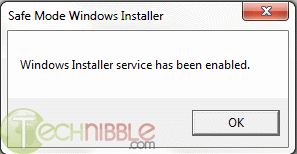
SafeMSI.exe – Start Windows Installer Service in Safe Mode

I have been frustrated many times over when working on a customer's machine in Safe Mode, which I do all the time, because one is not able to uninstall or install programs in Safe Mode. Basically the Microsoft Windows Installer program is not loaded in Safe Mode and is not usable.

This tiny program purports to make a registry change making the Installer program a Safe Mode program, meaning it is usable in Safe Mode, meaning one can uninstall, and presumably install, programs while in Safe Mode.

Note the part that says this program should be started up WHILE IN Safe Mode, not beforehand. That's a gotcha if you don't pay attention to this.

This is meant for those of you at a rather advanced level. For me, what I will do is carry the program on a flash dive at all times, and after having booted a customer's machine in Safe Mode, I will run the program from the flash drive.

I have not tried this yet, but I think it's worth a try if you are having issues that are better solved in Safe Mode.

The following comes from technibble.com:

SafeMSI.exe is a tiny, portable, freeware application designed to let you uninstall programs in safe mode. When the computer is in safe mode, the Windows Installer service isn’t started so most programs can’t be uninstalled. Since technicians do a lot of work in safe mode and being unable to uninstall is a huge bother. It is also not possible to start the service manually, an error message will come up saying “Could not start the Windows Installer service on Local Computer. Error 1084: This service cannot be started in Safe Mode”. This tool will do a registry tweak so that Windows Installer is made a safe service and it will launch the Windows Installer service. The tool is meant to be used after you are already in safe mode, it is a tiny .exe that just needs to be double-clicked or run and it runs very quickly.

The website mentions that the tool is compatible with Windows NT, 2000, XP and Server 2000. Although it doesn’t mention it, it is also compatible with newer versions including Windows 7.


Screenshots:


Wednesday, June 30, 2010

Leaving Jericho

My dear Vermont customers and friends,

The time has come for me to bid you and our beautiful State of Vermont farewell. Family calls. I have told many of you of our frequent trips to Boston to be with our grandkids. As things turned out, 3 of our 4 sons settled in the Boston area, and one of them is Dad to our only 2 grandkids. At my advanced age in this short life, it just makes sense for us to relocate to be near them and to leave our large home in Jericho, where we have lived for 30 years, 4 months, and one day. We moved today. We are happy to report that a young family with 2 young sons will replace us at 38.

I have come to know, admire, respect, and even call friends so many of you. Thank you, thank you, thank you, not just for your business, but the quality time you spent with me, allowing this stranger to enter your lives. I sincerely appreciate that, and I will miss you all.

As for the health of your home computers, please continue to read my blog. I will do my darnedest to continue to provide quality information that will help you keep your computers running smoothly and incident-free. Remember that I can still provide remote assistance as long as you are able to connect to the internet. This can serve you in a pinch, but frankly, it's just not the same as being able to visit you in your homes or mine and to have the face-to-face encounters I have so much enjoyed.

As I have told some of you, I cannot recommend any single individual to replace me who lives in the Jericho-Underhill area, simply because I don't know my local competition at all, if there even is any. What I will do is this: if any of you has had a successful relationship with anyone else from the area who has helped you when you were in a jam with your PC, please tell me who that was, and I will compile a list and send it out to all of you. Fair enough?

Also, if any of you would like to leave me some words of farewell, I would love to hear from you, so please write.

I wish you all well, safe and secure computing, and happiness and good health, and once again,

THANK YOU FOR YOUR BUSINESS!

Tom

Tuesday, June 29, 2010

iPhone 4 Review

Monday, June 28, 2010

iPhone 4 antenna issue: User error or design flaw?


This Erica Ogg piece can be found in its entirety at cnet.com. The link is below.

"After just a few days in customers' hands, the iPhone 4 has been demonstrated to show signal loss when gripped in a certain way. Apple is writing it off as easily fixable by altering the way it's held. But is it a problem with the way customers are holding it or a flaw in Apple's design?

The iPhone 4, which went on sale for the first time Thursday, has two antennas built very close to the metal band running around the exterior of the device. The one running on the left side of the phone is for Bluetooth and Wi-Fi, the one on the right is for cellular reception. Steve Jobs said recently this design was intended to improve reception.

But by Wednesday night, complaints began popping up among users who received early delivery, that when the phone is gripped in a way that touches the left bottom area of the phone, reception degrades or disappears in some cases. In CNET's own testing we were able to replicate the problem in the iPhone 4 in some cases, though it appeared to vary by person, place, and device. Apple acknowledged the issue Thursday night."

Friday, June 25, 2010

Farewell desktop?

I never thought I'd be saying this, but in preparing for our move I packed up my old and trusty IBM desktop PC. In doing so, I realized how little I have used it lately, and how dependent I have become on my laptop instead. I may never unpack the old desktop and bring it up to date and begin using it again. I'm not sure, but I have to say that I have become accustomed to using a laptop as a fulltime PC. I have two Acer laptops and they have been incredibly reliable. One is W7 (upgraded from Vista) and the other is a good old XP machine. With these 2 I can service most all of my customers' needs, and see little need for my desktop. One thing I liked about the desktop was high capacity hard drive space. Generally speaking, you can grow your desktop by adding an additional drive or by making an image copy and then installing a high capacity drive. This is not an easy thing to do with a laptop, but I find my external 1TB Western Digital MyBook satisfies my demand for growing disk space.

So it remains to be seen, but for now I think there is a good possibility I may be wishing my desktop RIP.

Thursday, June 24, 2010

Lenovo Support Website Infects Visitors with Trojan

Who can you trust?

From technibble.com

"PC manufacturer Lenovo had its support website attacked over the weekend when some hackers infected the site with a rogue IFrame, reports Softpedia.com. Visitors looking for drivers have since then been exposed to several exploits that will infect them with the Bredolab trojan. The Lenovo site had been confirmed as infected since at least Sunday afternoon; there are reports of visitors getting antivirus warnings from the website since Saturday.

The IFrame that was injected into the website points to an exploit kit hosted on the domain volgo-marun.cn. The kit would run a few checks to see what software was on the victim’s computer and then serve an exploit pointed at older versions of Internet Explorer, Adobe Reader, or Flash. The exploit tries to remotely execute a file that contains the Bredolab virus. Le Minh Hung, senior security researcher at Vietnamese antivirus vendor Bkis explains,

These exploit codes attempt to load file hxxp://volgo-marun.cn/pek/exe.exe which is a virus, onto victim’s computer. The virus is a new variant of Bredolab Botnet […]. After being loaded onto the computers, the virus copies itself as %Programs%\Startup\monskc32.exe and receives commands from C&C server with domain sicha-linna8.com.

The download.lenovo.com subdomain was blacklisted by Google when the attack was occurring so Firefox or Google Chrome browsers would display a warning when the site was visited. After searching for an update about this attack and visiting the Lenovo support site on my own computer, the attack seems to be cleaned up by now."

Wednesday, June 23, 2010

Google Voice Opens Up to All US Residents

Google Voice is a very nice, and free, service. I was one who got an early number. Using that number, you can forward all incoming calls to other real phone numbers, like your cell, home, office phones, etc. Very neat and a handy tool. And did I say FREE? ;-)

This article can be seen at Maximum PC's web site here

"It was just last spring that we saw Google Voice invites go out to a lucky few. The web-based service has gone on to provide over one million users with a single number to manage their communications. Now Google has opened up the service to all residents of the USA. The good people of less Googley nations will just have to hold tight.

Google Voice provides users with a new Google number that can be connected to multiple phone lines. Calling a Google Voice number will ring all phones connected with an account, but special scheduling rules can control which phones ring when. Google has been slowly rolling out new features to Voice in this last year. There is now a solid mobile web app for iPhone users, who are still prohibited from having a real app. Google has integrated voicemails into Gmail as well.

If you haven't used Google Voice, give it a shot. We are quite taken with the service around here. Even if you don't want to use the number, you can just use call forwarding to use Google's voicemail instead of your carrier's. You can also get free text messaging, and who doesn't want that? Users of Android phones will find some amazing integration with the service as well. Tell us about any Google Voice tips you have in the comments."

Tuesday, June 22, 2010

Yet another new rogue program

Those of you who have been hit by one of the many, many rogue programs out there can appreciate Bharath's Security Blog.


This guy really keeps on top of what is happening out there. How he does this I don't know, but I am thankful for his work. I'd recommend bookmarking his blog and checking it once a week. You may be able to avoid being hit by one of these rogues, or if you have been infected, you may find the cure.

Saturday, June 19, 2010


Defense Center

Defense Center

Defense Center is the latest rogue security application from CoreGuard Antivirus 2009 rogue family.


Defense Center rogue replaces Protection Center rogue security application and also inherits all its behavior.

Screenshot of Defense Center application


Bharath M N

Friday, June 18, 2010

Top All-Purpose Laptops

From PcWorld.com:

"These laptops can do it all and are a great choice for most notebook users. Ratings and rankings can change due to pricing and technology changes, so check back frequently for the latest info".


http://www.pcworld.com/reviews/collection/1657/top_10_allpurpose_laptops.html?&tk=hp_fv

Thursday, June 17, 2010

Q & A: System Mechanic vs. Tune-Up Utilities

A customer writes:

"Hi tom thanks for the link to your blog re Tuneup Utilities. Guess I overlooked it - too quickly scanning the titles of the blogs.


Maybe I should switch to that program and stop the System Mechanic - are you familiar with that set of utilities, and the differences? I do have trouble being patient waiting for it to load - abysmally slow. Thanks for your input." 

Answer:

"xxxxx, there are so many options out there, so many people vying for our money, that as much as I might like to be familiar with them all, I am just one person and can't be. I know nothing about SM. I just went to their web site and would agree that it is probably the same as TuneUp Utilities. It also looks to be priced at about the same level.

If you have a newer version of SM I'd suggest you stick with it and learn about each of its components, find which ones seem important (registry cleaner and registry defrag are two) and get to be somewhat of an expert on a few of its components and use them regularly (once a month or so).

I suggest Googling "System Mechanic reviews" or other variations of that to do a little research. Here's one, but whenever you do this note the date of the review and realize these are sometimes out of date relative to a newer version.

http://www.zdnet.com/blog/gadgetreviews/review-iolo-system-mechanic/826

Tom"

Wednesday, June 16, 2010

MSRT Follow-up

This post is a follow-up to my June 9 post about Microsoft's Malicious Software Removal Tool (MSRT). MSRT is a program distributed monthly, with updates, from Microsoft through their Automatic Updates.

I have long recommended that you should manually run a Full Scan each month with this tool because I had a suspicion that by default the program was run with a Quick Scan in the background as a part of the monthly distribution.

It turns out I was correct. Microsoft will have MSRT only run a Quick Scan, so my recommendation to manually run a full scan stands.

However, the method I recommended was the long way around the barn. After you run the monthly updates from Microsoft, you can start MSRT by simply clicking on START/RUN and enter MRT and click OKAY. Go ahead and try it now. MSRT will start up. Take note of the date up at the top of the MSRT window that opens up. It should say June 2010 at this point in time.Next month it should say July 2010, etc.

Then start a full scan. Do this each month for a little bit of extra and free security for your system.

Tuesday, June 15, 2010

What You Need to Know about Office 2010 Starter

For those of you who just can't wait to learn more about the latest MS Office product, here is an article from maximumpc.com

Mary Jo Foley over at ZDNet is pleading with readers to do their homework before jumping on the Office 2010 Starter bandwagon, and with good reason. Microsoft's Office 2010 productivity software goes on sale tomorrow and while it's true that the ad-supported Starter edition will be free, you might be getting less than you bargained for.

It's hard to argue with free, but it's worth noting that Microsoft gutted the Starter edition to only include basic document viewing and editing of Word and Excel. The goal is not to give Office away, but to entice users to upgrade, which some point out sounds a lot like trialware.
"Incorrect messaging of Office Starter 2010 may discourage your customers from purchasing a full Office suite and could also lead to customer dissatisfaction and confusion," Microsoft wrote in a note to its OEM partners. "Market research shows that many people confused Office Starter 2010 with a full Office suite, and were then dissatisfied because they believed they had received a full Office suite."

In other words, be weary of OEM system builders advertising Office Starter 2010 -- a practice Microsoft is discouraging -- and know exactly what it is you're getting (or not getting).


Monday, June 14, 2010

Q&A: How do I backup my My Documents folder?

A customer writes:

"Dear Tom,

When you worked on my computer (remotely) on March 15, I had you back up my "My Documents" from the "C" drive to my External "F" drive.

My "F" drive now has an entry entitled "My documents backed up on
3-15-2010". I need to do that periodically.

I'm embarrassed to say, I can't remember how you did that, and I can't figure it out by myself. Is that something you can briefly explain to me? Thanks."

Answer:

Not too briefly! :-)

Be sure your external drive is attached to your PC & powered on.

Click on Start and then My Computer (or just Computer in Windows 7).

Double click on the icon shown for your external drive.

Click on File, then New, then Folder

Immediately key in "My Documents backed up on 6-14-2010" and hit Enter

This should have created a new folder with that name. Look on the right half of the screen and you should see the new folder you just created. It is probably at the bottom of the list. Okay? Good, skip the next step. If not, do you see a folder named New Folder? If you do, be sure it is empty and then right click on it and select Delete.

Repeat the above two steps until you get it. Many users do not pay attention to the word "Immediately" above. All I am stressing is that you should key in the name of the new folder WITHOUT hitting your Enter key first!

Okay, you now have the new folder within which you will be backing up your My Documents folder.

Now, within the same window, scroll up to the top and on the left side of the screen you should see your My Documents folder. Yes? Good go to next step. No? Bad! Try again, restarting by closing the window and right-clicking on Start and select Explore.

Do you now see My Documents at the top of the left side of the screen? If not, I must have messed up. Please write me again and tell me where you are in the above steps.

Okay, when you see your My Documents folder displayed, click on it once and then on the right side of the screen you will see all of the contents of your My Documents folder. You will likely see many folders you should recognize and below them, perhaps, some stragglers - files that probably belong in one of your folders.

Click on Edit and then Select All, and all of the folders and files on display on the right side of the screen, the contents of My Documents, should be selected and highlighted (in dark blue on my PC).

Click on Edit again, and this time select COPY TO FOLDER.

In the next window that pops up, scroll down until you see your external drive, expand it if necessary (by clicking on the + sign to the left of the drive designation letter, and below it you will see (among others) the new folder you created. Select the new folder, clicking on it once, and click on OK down below.

This should start the copy of your My Documents to the new backup folder.

When done, compare the contents to make sure that everything was copied successfully.

As I write this I am on a W7 machine, so there may be some slight difference if you are on XP or Vista, but the general procedure is the same. Write me if any problems, pcdoc at brpcdoc dot com.

I received this e-mail the next day (6/15/2010)

"Dear Tom,

Thank you so much. I followed the instructions on the blog and
everything went very well. I am now in the
regular-backing-up-business. I had been getting so nervous because I
had not been backing up my C drive"

Friday, June 11, 2010

Laptop Security

This is a result of sheer stupidity.

From Facebook:

WAYLAND, MA POLICE DEPARTMENT Two vehicles were broken into while parked at the Sandy Burr Country Club during the day on Monday. The side windows were smashed and two laptop computers were stolen. Police detectives are investigating the incident. If you have any information, please call the tip line (508-358-1726). Never leave valuables in plain sight, take a minute and lock valuable items in your trunk.

Thursday, June 10, 2010

7 Sites With Laptop Teardown Guides & Other Laptop Repair Resources

Okay, this is a bit much for most of you who don't really want to mess around with hardware, but for those of you with a laptop who may have wondered what is going on under the covers, and who may want to attempt a repair on your own, this will prove most helpful.

A word of warning: when disassembling a laptop it is entirely possible that one small slip could make the whole thing impossible to put back together again, so be very careful and follow directions if you ever want to attempt any of these repairs.

This comes from our good friend from way down under at http://www.technibble.com/.

"There is a huge percentage of Computer Technicians out there know how to fix both laptops and desktops. However, the problem with repairing laptops is getting them apart. There are often screws hidden under stickers, special clips that need to be squeezed in a certain way and usually the laptop needs to be disassembled in a certain order.

Of course, it helps if you have a Service Guide to show you how to get the laptop apart; but they are sometimes difficult to get. For example, Apple only allows their service manuals to be viewed by AASP certified businesses/technicians and other brands guard their service manuals fairly closely as well.

Because of this, I have created this small list of sites where you can obtain Laptop teardown guides.

Official Sources
These are some of the manufacturers that actually share their tear down guides. The majority do not.

Many of these links contain other information about the laptop (drivers, specifications etc..), so look for either the “Maintenance Guide” or “Service Guide” on these pages.

Dell Laptops

HP & Compaq Laptops

Toshiba Thinkpad Laptops

Other Sources
Tims Laptop Service Manuals – Large list of laptop repair manuals. Scroll about 1/4 down the page to see the manuals.


Inside My Laptop – Guide on how to replace various laptop parts.

EServiceInfo – A large (somewhat unorganised) archive of service manuals.

IFixIt – IFixIt has teardown guides for Apple computers, PCs and many other consumer electronics.

Of course, if you want to know how to repair laptops (brand unspecific) then I highly recommend Podnutz’s Laptop Repair Videos.

It is difficult to get service guides for many brands so if you know of any other resources, please post them in the comments below."

Wednesday, June 9, 2010

Microsoft Update

Last night before bed I noticed the system tray icon indicating there were updates ready for me to install. I looked into it and found there were 17 updates. 8 of these were for MS Office and 8 were for Windows 7. The 17th was the monthly Malicious Software Removal Tool (MSRT). I installed all 17 updates, rebooted, and then went immediately to download the June MSRT so I could run it full scan, a practice I have gotten into lately. As of this moment I am not really sure this isn't a waste of time, but I view it as a painless and free extra bit of security (an ounce of prevention as it were).

This morning I found the usual window indicating no problems were found, so that makes me feel good, but this month I intend to read up on MSRT and see if what I do is worth it. In the meantime I continue to recommend that you do his too.

Tuesday, June 8, 2010

Is Microsoft Considering Buying AOL?

Oh boy, I hope so. I detest AOL and feel so sorry for people who still use it, especially those who seem not to have gotten the word that AOL is free and are still paying for it. There are many of them, believe it or not. My hope is that MS does buy AOL and charts a course for current AOL users to get the heck free of it and maybe migrate to a MS product. Not that MS has anything so good that all should rush into it, but nothing is as bad as AOL. But then, why should I complain? I have made a lot of money charging people to fix their AOL problems over the years.

I have a hard time believing that AOL still exists. Maybe the end is in sight? I sure hope so. If any of you reading this is an AOL user and wants to get off of it, I'd be glad to help ($$$) :-)

Thanks for this maximumpc.com: Is Microsoft Considering Buying AOL?

Monday, June 7, 2010

The smart paranoid's guide to using Google

Written just for me, except for the 'smart' part! Thank you computerworld.com.

Seriously, if you use a lot of Google's stuff (offerings) as I do, this is must reading.

The smart paranoid's guide to using Google

Saturday, June 5, 2010

Make your passwords unbreakable but memorable

Some good ideas on how to create strong passwords. This is becoming an increasingly important topic.

From the Kim Komando web site:

Make your passwords unbreakable but memorable

Thursday, June 3, 2010

MVPS HOSTS File for June Available Now

This is the last time I will post such a reminder. Those of you who are now using the MVPS HOSTS file should know that a new version is made available on a monthly basis, and these days you need to go look for it. I suggest you bookmark this web site, http://msmvps.com/blogs/hostsnews/default.aspx and go check it out near the beginning of each month until you see the new version available. You can download it right from this site.

The MVPS HOSTS file is an integral part of my recommended security suite and, as with all the other pieces of that pie, this is free.

Wednesday, June 2, 2010

Google to Release Chrome OS in Fourth Quarter

from pcworld.com:


"Google plans to release its Chrome operating system late this year, initially targeting laptop users, the head of the project said Wednesday.
The Chrome OS "will be offered to users in the fourth quarter," said Sundar Pichai, Google's vice president of product management, during a speech at the Computex electronics exhibition in Taipei.

The statement appears to push back earlier talk of a third-quarter launch for the OS, which is expected to compete with Microsoft's Windows 7 as well as other OSes.
The Chrome Web Store will open at the same time so people can download Web applications that can be installed on the Chrome OS, he added.
"For Chrome OS, we are focused on laptops for this year," he said at a news conference later in the day.

The company designed Chrome OS for clamshell devices with touchpads, keyboards and screens between 10 inches and 12 inches across, he said, clarifying that anything, including netbooks, that fits the hardware specifications will have an easy time gaining Google certification.

Certification by the company is meant to ensure hardware makers create a quality device for users.
Initially, Chrome OS will limit certain customization such as user interfaces that some Taiwanese laptop makers are planning, but over time more customization will be allowed. "So, yes to UIs, but later," he said.

Tuesday, June 1, 2010

Opinion: RIP PC - Apple is on top, and the time of the PC is ended

An opinion piece from computerworld.com:

Computerworld - On May 26, Apple's market capitalization stood at $223 billion. That took it, for the first time, higher than Microsoft, which had a market cap of $219.3 billion. Apple, not Microsoft, not Google, was at the top of the technology business mountain. And that marked the end of an era: The PC is no longer the center of the computing universe

The PC: August 12, 1981 -- May 26, 2010. RIP.

The powerhouse of the computing revolution was born when IBM released the first IBM PC in August 1981. It died when Apple took the market lead from Microsoft.

Yes, of course, there were PCs before the IBM PC. I used Zilog Z-80-based microcomputers running CP/M back in the late '70s. But it was the IBM PC that moved PCs from things that only computer fans would use to essential parts of most business offices.

Monday, May 31, 2010

Memorial Day 2010

Memorial Day Home 
Page
How To ObserveMemorial Day
"...gather around their sacred remains and garland the passionless mounds above them with choicest flowers of springtime....let us in this solemn presence renew our pledges to aid and assist those whom they have left among us as sacred charges upon the Nation's gratitude,--the soldier's and sailor's widow and orphan." --General John Logan, General Order No. 11, 5 May 1868

The "Memorial" in Memorial Day has been ignored by too many of us who are beneficiaries of those who have given the ultimate sacrifice. Often we do not observe the day as it should be, a day where we actively remember our ancestors, our family members, our loved ones, our neighbors, and our friends who have given the ultimate sacrifice:

  • by visiting cemeteries and placing flags or flowers on the graves of our fallen heroes.
  • by visiting memorials.
  • by flying the U.S. Flag at half-staff until noon.
  • by flying the 'POW/MIA Flag' as well (Section 1082 of the 1998 Defense Authorization Act).
  • by participating in a "National Moment of Remembrance": at 3 p.m. to pause and think upon the true meaning of the day, and for Taps to be played.
  • by renewing a pledge to aid the widows, widowers, and orphans of our falled dead, and to aid the disabled veterans.
Also, please consider adding your voice in support of the efforts to restore the traditional day of observance of Memorial Day back to May 30th (instead of "the last Monday in May"). This would help greatly to return the solemn meaning back to the day, and to help return minds and hearts to think upon the ultimate sacrifices made by those in service to our country. Just one day out of the year to honor our loved ones, our ancestors, our friends who died in conflicts and wars -- not to honor war, but those that died in those conflicts and wars. I receive many emails from people expressing their thanks for those who have served and gave the ultimate sacrifice for this country. The following, received in 1999 and used with the author's permission, sums up all the emails I have received very elegantly, and is true to the original spirit and meaning of Memorial Day.

"This weekend I am going to do something different. I am going to buy some carnations each day and go to one of the nearby cemetaries and walk through the sections for soldiers. When I find a grave that has no flowers, I'll leave one and say a prayer for the family of that person, who for some reason could not bring their soldier flowers. I will pray for our country and all who serve or have served. For their families, who also serve by losing precious days, weeks and months spent with their loved ones who are off serving, preserving peace and the freedom we have in this country. I'll pray for the families who paid the ultimate price, who's loved ones died, or were taken captive and never returned. I'll pray for anyone who may still be held in captivity and thinks perhaps they are forgotten. I do NOT forget. I'll say a prayer for every person on the Internet who takes a moment from their time to come to sites like yours and be reminded of what this holiday really means. And I'll say a prayer of thanks and ask God's richest blessings on you.
Thank you again.... and God bless!
Sylvia Mohr"
No, Thank you and God Bless you, Sylvia. May more follow your example. In fact, wonderful people in other nations sometimes show more of the true spirit and mission of the U.S. Memorial Day than we do here. For example, a 2001 US Memorial Day Guestbook entry from a citizen of the Netherlands states:
"Hi, In 1999 I laid flowers at the grave of a young U.S. fighter pilot who was KIA in my village in 1945. In the Netherlands I know of schools 'adopting' graves of Allied servicemen, keeping those graves in excellent condition ! Does anybody know of adopting graves in the U.S. by schools ?
Sincerely,
Paul Patist <patist@wanadoo.nl>
Castricum, The Netherlands - Tue May 15 04:50:29 2001"
More schools in the U.S. could follow the lead of the Netherland schools. Let us take a few moments this Memorial Day to reflect on the meaning of the day, to observe the day and be mindful of the sacrifices of others before we go and