This is an oldie but goodie that I first posted in 2008, and at that time the post was titled Making Windows XP Last for Another 6 Years! Note that the title has been changed to 4 years!!
I have come to use my desktop, referenced in the original post, much less these days. As a matter of fact since we moved I have not unpacked it. I have become quite happy using a laptop. I have 2 Acers, and one runs Windows XP and the other, my new primary machine, runs Windows 7.
If you have Windows XP, whether a desktop or laptop, and want to continue using it for some time, you are in good company and can plan on using it for another 4 years if you keep it updated and follow my recommended security suite of free programs. One note I would make is that I did upgrade the RAM from 1GB to 2GB, and I would urge you to do the same if your machine has that capacity.
Monday, July 26, 2010


Monday, July 19, 2010
Using the HOSTS file to block certain web sites
The oft-discussed HOSTS file is nothing more than a list of web sites that will be blocked if you try to get to them. If you use the recommended MVPS HOSTS file, the list of web sites contains web addresses of sites that have been known to cause trouble.
Suppose you have someone in your house who is visiting a web site that you'd like to block? If that is the case, you can manually add the site, or sites as the case may be, to your HOSTS file.
Here is how to do it. In order to follow these instructions you need to have view access to hidden and system files. To gain this access you can go into Windows Explorer, Tools/Folder Options/View. Once there, uncheck the boxes that prevent you from viewing these files.
Now that you can view hidden and system files, go to this location, C:\Windows\System32\drivers\etc. Once there you will see the HOSTS file. In XP, right click on the filename, select Open With, and then select Notepad.

Once the file is opened, you can simply insert a blank line anywhere you like, and either paste the web site you wish to block or key it in manually. Then SAVE the file. Voila, the offensive web site is now blocked on your system (after the next reboot). I would suggest you take note of the sites you add, and keep them all together like starting maybe at line 100, because remember this file will become the OLD file next month with the latest update and you will have to copy them all into the new HOSTS file.
Write me if you need help with this.
Suppose you have someone in your house who is visiting a web site that you'd like to block? If that is the case, you can manually add the site, or sites as the case may be, to your HOSTS file.
Here is how to do it. In order to follow these instructions you need to have view access to hidden and system files. To gain this access you can go into Windows Explorer, Tools/Folder Options/View. Once there, uncheck the boxes that prevent you from viewing these files.
Now that you can view hidden and system files, go to this location, C:\Windows\System32\drivers\etc. Once there you will see the HOSTS file. In XP, right click on the filename, select Open With, and then select Notepad.

Once the file is opened, you can simply insert a blank line anywhere you like, and either paste the web site you wish to block or key it in manually. Then SAVE the file. Voila, the offensive web site is now blocked on your system (after the next reboot). I would suggest you take note of the sites you add, and keep them all together like starting maybe at line 100, because remember this file will become the OLD file next month with the latest update and you will have to copy them all into the new HOSTS file.
Write me if you need help with this.
Friday, July 16, 2010
Checking the health of your hard drive
An oldie but goodie, running Chkdsk (Check Disk). This is worth doing once every 6 months or when required. Complete detailed instructions are included.
Thursday, July 15, 2010
Spybot's Immunize function and the new MVPS HOSTS file
I have known for a long time that Spybot's Immunize function adds a considerable amount of data to the end of the HOSTS file which, in my case is the MVPS HOSTS file. I remember having an e-mail discussion with the author of the MVPS HOSTS file and telling him this. At the time he was not aware of this, and so we agreed I would send him supporting data (before and after Spybot's run HOSTS files). It is quite clear what Spybot's Immunize does (at least in this regard) when one takes a look at the before and after HOSTS files.
What am I talking about you may ask?
What I am getting at is that the author of the MVPS HOSTS file was not, at that time, impressed by what Spybot did, and he seemed to say it was a waste, most likely redundant data added to the end- I forget. In any case, I am doing something new now because of this.
This morning I noticed that the new July version of the MVPS HOSTS file was available. I took a look at my current HOSTS file (the June version) and it was, best I can recall, 597KB in size. I then ran Spybot (update, immunize, and sarch & destroy). My HOSTS file went from 597KB to nearly 1MB, a substantial increase. FYI, the entire HOSTS file is loaded into memory at boot time, so this is a substantial increase which buys one little or nothing.
My new approach is this. When the new monthly MVPS HOSTS file is made available, I will first do a full Spybot run and THEN install the new MVPS HOSTS file. I will thus wind up with a HOSTS file in size of about 600KB vs. one of about 1MB, knowing the larger version would do me little or no good. Capiche? If not, please ask.
What am I talking about you may ask?
What I am getting at is that the author of the MVPS HOSTS file was not, at that time, impressed by what Spybot did, and he seemed to say it was a waste, most likely redundant data added to the end- I forget. In any case, I am doing something new now because of this.
This morning I noticed that the new July version of the MVPS HOSTS file was available. I took a look at my current HOSTS file (the June version) and it was, best I can recall, 597KB in size. I then ran Spybot (update, immunize, and sarch & destroy). My HOSTS file went from 597KB to nearly 1MB, a substantial increase. FYI, the entire HOSTS file is loaded into memory at boot time, so this is a substantial increase which buys one little or nothing.
My new approach is this. When the new monthly MVPS HOSTS file is made available, I will first do a full Spybot run and THEN install the new MVPS HOSTS file. I will thus wind up with a HOSTS file in size of about 600KB vs. one of about 1MB, knowing the larger version would do me little or no good. Capiche? If not, please ask.
HOSTS News (worth bookmarking)
Wednesday, July 14, 2010
Microsoft Windows Malicious Software Removal Tool
I had 5 updates from Microsoft yesterday. You'll all have differing numbers, bu mine was 5. One of these was the monthly MS Malicious Software Removal Tool ( I call it MSRT for obvious reasons). I promised last month that I'd follow up with someI better information about this tool. This is what I found:
Microsoft will only run a Quick Scan with the tool after it is downloaded and installed. This is as I had thought and is why I have always recommended that we all manually run a Full Scan. MS will run a quick scan in stealth mode. You'll never know when it is running and you won't see any output from the tool - unless it finds a problem.
The first thing you should do once you have checked your updates (Check the update history to see if it was installed this week) is to run a Full Scan. There is a quick and easy way to do this, much simpler than the method I have posted in the past. First click on START, then RUN, and enter MRT (go figure why they left out the S) in the command line then click on OK.

Yes, you can click on that picture above to see the larger version.
In the resulting window note the month in the application banner at the top of the window.
 In this case it says July 2010, and yours should as well. Click on Next and then select Full Scan. Just let it run. It takes forever but should not impact your use of your machine. It seems to have very low overhead.
As I post this, mine has been running for over 2.5 hours and it may run a lot longer. I don't care because it is very cheap insurance. Go for it!
Microsoft will only run a Quick Scan with the tool after it is downloaded and installed. This is as I had thought and is why I have always recommended that we all manually run a Full Scan. MS will run a quick scan in stealth mode. You'll never know when it is running and you won't see any output from the tool - unless it finds a problem.
The first thing you should do once you have checked your updates (Check the update history to see if it was installed this week) is to run a Full Scan. There is a quick and easy way to do this, much simpler than the method I have posted in the past. First click on START, then RUN, and enter MRT (go figure why they left out the S) in the command line then click on OK.

Yes, you can click on that picture above to see the larger version.
In the resulting window note the month in the application banner at the top of the window.

As I post this, mine has been running for over 2.5 hours and it may run a lot longer. I don't care because it is very cheap insurance. Go for it!
Tuesday, July 13, 2010
Summer Doldrums
Doldrums definition: a state or period of inactivity, stagnation, or slump. Things have been busy and I am having trouble trying to post to this blog on a daily basis.
So, instead of being totally idle, I will from time to time provide links to some oldies but goodies. I had a customer tell me recently that she forgot how to defragment her hard drive. It's important that you do this regularly, like maybe every 3 months or so. At this link you will find detailed instructions on how to do this. Do it even if the Analyze step says you don't need to do it.
So, instead of being totally idle, I will from time to time provide links to some oldies but goodies. I had a customer tell me recently that she forgot how to defragment her hard drive. It's important that you do this regularly, like maybe every 3 months or so. At this link you will find detailed instructions on how to do this. Do it even if the Analyze step says you don't need to do it.
Friday, July 9, 2010
New Laptop From Toshiba Is Lightweight and Speedy
From the Wall Street Journal's Walt Mossberg, comes a review of a new Toshiba laptop. I thought this strange that he should review one laptop like this, but if you are looking for a new laptop, here is another one to consider. It ain't cheap.
Thursday, July 8, 2010
How to Buy a Desktop PC
For those of you who prefer desktop computing, here is a very good article from pcmag.com.
"When buying a Desktop PC, you still need to make some choices when it comes to CPUs, memory, hard drive capacity and graphics technology. The good news is your money has never gone further.
Does your PC take so long to start up you have time to go get a cup of coffee-and drink it? Tried installing the latest game only to find out your graphics card is six generations too old to play it? Or maybe you just want to take advantage of the speed and reliability of operating systems like Microsoft Windows 7 and Snow Leopard. If any of these are true, then it is time for you to buy a new desktop PC. And we can help you do it."
"When buying a Desktop PC, you still need to make some choices when it comes to CPUs, memory, hard drive capacity and graphics technology. The good news is your money has never gone further.
Does your PC take so long to start up you have time to go get a cup of coffee-and drink it? Tried installing the latest game only to find out your graphics card is six generations too old to play it? Or maybe you just want to take advantage of the speed and reliability of operating systems like Microsoft Windows 7 and Snow Leopard. If any of these are true, then it is time for you to buy a new desktop PC. And we can help you do it."
Friday, July 2, 2010
Happy 4th
Happy 4th of July holiday weekend everyone. I am so grateful to be an American. I look forward to a nice long weekend with family and friends. I wish the same for you.


Thursday, July 1, 2010
SafeMSI.exe – Start Windows Installer Service in Safe Mode
I have been frustrated many times over when working on a customer's machine in Safe Mode, which I do all the time, because one is not able to uninstall or install programs in Safe Mode. Basically the Microsoft Windows Installer program is not loaded in Safe Mode and is not usable.
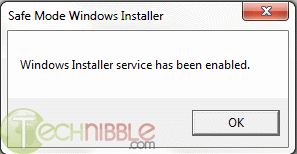
This tiny program purports to make a registry change making the Installer program a Safe Mode program, meaning it is usable in Safe Mode, meaning one can uninstall, and presumably install, programs while in Safe Mode.
Note the part that says this program should be started up WHILE IN Safe Mode, not beforehand. That's a gotcha if you don't pay attention to this.
This is meant for those of you at a rather advanced level. For me, what I will do is carry the program on a flash dive at all times, and after having booted a customer's machine in Safe Mode, I will run the program from the flash drive.
I have not tried this yet, but I think it's worth a try if you are having issues that are better solved in Safe Mode.
The following comes from technibble.com:
SafeMSI.exe is a tiny, portable, freeware application designed to let you uninstall programs in safe mode. When the computer is in safe mode, the Windows Installer service isn’t started so most programs can’t be uninstalled. Since technicians do a lot of work in safe mode and being unable to uninstall is a huge bother. It is also not possible to start the service manually, an error message will come up saying “Could not start the Windows Installer service on Local Computer. Error 1084: This service cannot be started in Safe Mode”. This tool will do a registry tweak so that Windows Installer is made a safe service and it will launch the Windows Installer service. The tool is meant to be used after you are already in safe mode, it is a tiny .exe that just needs to be double-clicked or run and it runs very quickly.
The website mentions that the tool is compatible with Windows NT, 2000, XP and Server 2000. Although it doesn’t mention it, it is also compatible with newer versions including Windows 7.
Screenshots:
This tiny program purports to make a registry change making the Installer program a Safe Mode program, meaning it is usable in Safe Mode, meaning one can uninstall, and presumably install, programs while in Safe Mode.
Note the part that says this program should be started up WHILE IN Safe Mode, not beforehand. That's a gotcha if you don't pay attention to this.
This is meant for those of you at a rather advanced level. For me, what I will do is carry the program on a flash dive at all times, and after having booted a customer's machine in Safe Mode, I will run the program from the flash drive.
I have not tried this yet, but I think it's worth a try if you are having issues that are better solved in Safe Mode.
The following comes from technibble.com:
SafeMSI.exe is a tiny, portable, freeware application designed to let you uninstall programs in safe mode. When the computer is in safe mode, the Windows Installer service isn’t started so most programs can’t be uninstalled. Since technicians do a lot of work in safe mode and being unable to uninstall is a huge bother. It is also not possible to start the service manually, an error message will come up saying “Could not start the Windows Installer service on Local Computer. Error 1084: This service cannot be started in Safe Mode”. This tool will do a registry tweak so that Windows Installer is made a safe service and it will launch the Windows Installer service. The tool is meant to be used after you are already in safe mode, it is a tiny .exe that just needs to be double-clicked or run and it runs very quickly.
The website mentions that the tool is compatible with Windows NT, 2000, XP and Server 2000. Although it doesn’t mention it, it is also compatible with newer versions including Windows 7.
Screenshots:
Wednesday, June 30, 2010
Leaving Jericho
My dear Vermont customers and friends,
The time has come for me to bid you and our beautiful State of Vermont farewell. Family calls. I have told many of you of our frequent trips to Boston to be with our grandkids. As things turned out, 3 of our 4 sons settled in the Boston area, and one of them is Dad to our only 2 grandkids. At my advanced age in this short life, it just makes sense for us to relocate to be near them and to leave our large home in Jericho, where we have lived for 30 years, 4 months, and one day. We moved today. We are happy to report that a young family with 2 young sons will replace us at 38.
I have come to know, admire, respect, and even call friends so many of you. Thank you, thank you, thank you, not just for your business, but the quality time you spent with me, allowing this stranger to enter your lives. I sincerely appreciate that, and I will miss you all.
As for the health of your home computers, please continue to read my blog. I will do my darnedest to continue to provide quality information that will help you keep your computers running smoothly and incident-free. Remember that I can still provide remote assistance as long as you are able to connect to the internet. This can serve you in a pinch, but frankly, it's just not the same as being able to visit you in your homes or mine and to have the face-to-face encounters I have so much enjoyed.
As I have told some of you, I cannot recommend any single individual to replace me who lives in the Jericho-Underhill area, simply because I don't know my local competition at all, if there even is any. What I will do is this: if any of you has had a successful relationship with anyone else from the area who has helped you when you were in a jam with your PC, please tell me who that was, and I will compile a list and send it out to all of you. Fair enough?
Also, if any of you would like to leave me some words of farewell, I would love to hear from you, so please write.
I wish you all well, safe and secure computing, and happiness and good health, and once again,
THANK YOU FOR YOUR BUSINESS!
Tom
The time has come for me to bid you and our beautiful State of Vermont farewell. Family calls. I have told many of you of our frequent trips to Boston to be with our grandkids. As things turned out, 3 of our 4 sons settled in the Boston area, and one of them is Dad to our only 2 grandkids. At my advanced age in this short life, it just makes sense for us to relocate to be near them and to leave our large home in Jericho, where we have lived for 30 years, 4 months, and one day. We moved today. We are happy to report that a young family with 2 young sons will replace us at 38.
I have come to know, admire, respect, and even call friends so many of you. Thank you, thank you, thank you, not just for your business, but the quality time you spent with me, allowing this stranger to enter your lives. I sincerely appreciate that, and I will miss you all.
As for the health of your home computers, please continue to read my blog. I will do my darnedest to continue to provide quality information that will help you keep your computers running smoothly and incident-free. Remember that I can still provide remote assistance as long as you are able to connect to the internet. This can serve you in a pinch, but frankly, it's just not the same as being able to visit you in your homes or mine and to have the face-to-face encounters I have so much enjoyed.
As I have told some of you, I cannot recommend any single individual to replace me who lives in the Jericho-Underhill area, simply because I don't know my local competition at all, if there even is any. What I will do is this: if any of you has had a successful relationship with anyone else from the area who has helped you when you were in a jam with your PC, please tell me who that was, and I will compile a list and send it out to all of you. Fair enough?
Also, if any of you would like to leave me some words of farewell, I would love to hear from you, so please write.
I wish you all well, safe and secure computing, and happiness and good health, and once again,
THANK YOU FOR YOUR BUSINESS!
Tom
Tuesday, June 29, 2010
iPhone 4 Review
There is a really good and complete, I believe, review of Apple's new iPhone 4 on Maximum PC today. I have scanned most of it (not really interested in it myself) and it appears to be a high quality review. If interested in this new much-more-than-a-phone from Apple. check out this review:
Monday, June 28, 2010
iPhone 4 antenna issue: User error or design flaw?
"After just a few days in customers' hands, the iPhone 4 has been demonstrated to show signal loss when gripped in a certain way. Apple is writing it off as easily fixable by altering the way it's held. But is it a problem with the way customers are holding it or a flaw in Apple's design?
The iPhone 4, which went on sale for the first time Thursday, has two antennas built very close to the metal band running around the exterior of the device. The one running on the left side of the phone is for Bluetooth and Wi-Fi, the one on the right is for cellular reception. Steve Jobs said recently this design was intended to improve reception.
But by Wednesday night, complaints began popping up among users who received early delivery, that when the phone is gripped in a way that touches the left bottom area of the phone, reception degrades or disappears in some cases. In CNET's own testing we were able to replicate the problem in the iPhone 4 in some cases, though it appeared to vary by person, place, and device. Apple acknowledged the issue Thursday night."
Friday, June 25, 2010
Farewell desktop?
I never thought I'd be saying this, but in preparing for our move I packed up my old and trusty IBM desktop PC. In doing so, I realized how little I have used it lately, and how dependent I have become on my laptop instead. I may never unpack the old desktop and bring it up to date and begin using it again. I'm not sure, but I have to say that I have become accustomed to using a laptop as a fulltime PC. I have two Acer laptops and they have been incredibly reliable. One is W7 (upgraded from Vista) and the other is a good old XP machine. With these 2 I can service most all of my customers' needs, and see little need for my desktop. One thing I liked about the desktop was high capacity hard drive space. Generally speaking, you can grow your desktop by adding an additional drive or by making an image copy and then installing a high capacity drive. This is not an easy thing to do with a laptop, but I find my external 1TB Western Digital MyBook satisfies my demand for growing disk space.
So it remains to be seen, but for now I think there is a good possibility I may be wishing my desktop RIP.
So it remains to be seen, but for now I think there is a good possibility I may be wishing my desktop RIP.
Thursday, June 24, 2010
Lenovo Support Website Infects Visitors with Trojan
Who can you trust?
From technibble.com
"PC manufacturer Lenovo had its support website attacked over the weekend when some hackers infected the site with a rogue IFrame, reports Softpedia.com. Visitors looking for drivers have since then been exposed to several exploits that will infect them with the Bredolab trojan. The Lenovo site had been confirmed as infected since at least Sunday afternoon; there are reports of visitors getting antivirus warnings from the website since Saturday.
The IFrame that was injected into the website points to an exploit kit hosted on the domain volgo-marun.cn. The kit would run a few checks to see what software was on the victim’s computer and then serve an exploit pointed at older versions of Internet Explorer, Adobe Reader, or Flash. The exploit tries to remotely execute a file that contains the Bredolab virus. Le Minh Hung, senior security researcher at Vietnamese antivirus vendor Bkis explains,
These exploit codes attempt to load file hxxp://volgo-marun.cn/pek/exe.exe which is a virus, onto victim’s computer. The virus is a new variant of Bredolab Botnet […]. After being loaded onto the computers, the virus copies itself as %Programs%\Startup\monskc32.exe and receives commands from C&C server with domain sicha-linna8.com.
The download.lenovo.com subdomain was blacklisted by Google when the attack was occurring so Firefox or Google Chrome browsers would display a warning when the site was visited. After searching for an update about this attack and visiting the Lenovo support site on my own computer, the attack seems to be cleaned up by now."
From technibble.com
"PC manufacturer Lenovo had its support website attacked over the weekend when some hackers infected the site with a rogue IFrame, reports Softpedia.com. Visitors looking for drivers have since then been exposed to several exploits that will infect them with the Bredolab trojan. The Lenovo site had been confirmed as infected since at least Sunday afternoon; there are reports of visitors getting antivirus warnings from the website since Saturday.
The IFrame that was injected into the website points to an exploit kit hosted on the domain volgo-marun.cn. The kit would run a few checks to see what software was on the victim’s computer and then serve an exploit pointed at older versions of Internet Explorer, Adobe Reader, or Flash. The exploit tries to remotely execute a file that contains the Bredolab virus. Le Minh Hung, senior security researcher at Vietnamese antivirus vendor Bkis explains,
These exploit codes attempt to load file hxxp://volgo-marun.cn/pek/exe.exe which is a virus, onto victim’s computer. The virus is a new variant of Bredolab Botnet […]. After being loaded onto the computers, the virus copies itself as %Programs%\Startup\monskc32.exe and receives commands from C&C server with domain sicha-linna8.com.
The download.lenovo.com subdomain was blacklisted by Google when the attack was occurring so Firefox or Google Chrome browsers would display a warning when the site was visited. After searching for an update about this attack and visiting the Lenovo support site on my own computer, the attack seems to be cleaned up by now."
Wednesday, June 23, 2010
Google Voice Opens Up to All US Residents
Google Voice is a very nice, and free, service. I was one who got an early number. Using that number, you can forward all incoming calls to other real phone numbers, like your cell, home, office phones, etc. Very neat and a handy tool. And did I say FREE? ;-)
This article can be seen at Maximum PC's web site here
"It was just last spring that we saw Google Voice invites go out to a lucky few. The web-based service has gone on to provide over one million users with a single number to manage their communications. Now Google has opened up the service to all residents of the USA. The good people of less Googley nations will just have to hold tight.
Google Voice provides users with a new Google number that can be connected to multiple phone lines. Calling a Google Voice number will ring all phones connected with an account, but special scheduling rules can control which phones ring when. Google has been slowly rolling out new features to Voice in this last year. There is now a solid mobile web app for iPhone users, who are still prohibited from having a real app. Google has integrated voicemails into Gmail as well.
If you haven't used Google Voice, give it a shot. We are quite taken with the service around here. Even if you don't want to use the number, you can just use call forwarding to use Google's voicemail instead of your carrier's. You can also get free text messaging, and who doesn't want that? Users of Android phones will find some amazing integration with the service as well. Tell us about any Google Voice tips you have in the comments."
This article can be seen at Maximum PC's web site here
"It was just last spring that we saw Google Voice invites go out to a lucky few. The web-based service has gone on to provide over one million users with a single number to manage their communications. Now Google has opened up the service to all residents of the USA. The good people of less Googley nations will just have to hold tight.
Google Voice provides users with a new Google number that can be connected to multiple phone lines. Calling a Google Voice number will ring all phones connected with an account, but special scheduling rules can control which phones ring when. Google has been slowly rolling out new features to Voice in this last year. There is now a solid mobile web app for iPhone users, who are still prohibited from having a real app. Google has integrated voicemails into Gmail as well.
If you haven't used Google Voice, give it a shot. We are quite taken with the service around here. Even if you don't want to use the number, you can just use call forwarding to use Google's voicemail instead of your carrier's. You can also get free text messaging, and who doesn't want that? Users of Android phones will find some amazing integration with the service as well. Tell us about any Google Voice tips you have in the comments."
Tuesday, June 22, 2010
Yet another new rogue program
Those of you who have been hit by one of the many, many rogue programs out there can appreciate Bharath's Security Blog.
This guy really keeps on top of what is happening out there. How he does this I don't know, but I am thankful for his work. I'd recommend bookmarking his blog and checking it once a week. You may be able to avoid being hit by one of these rogues, or if you have been infected, you may find the cure.
Defense Center is the latest rogue security application from CoreGuard Antivirus 2009 rogue family.

Defense Center rogue replaces Protection Center rogue security application and also inherits all its behavior.

Bharath M N
This guy really keeps on top of what is happening out there. How he does this I don't know, but I am thankful for his work. I'd recommend bookmarking his blog and checking it once a week. You may be able to avoid being hit by one of these rogues, or if you have been infected, you may find the cure.
Saturday, June 19, 2010
Defense Center
Defense Center
Defense Center is the latest rogue security application from CoreGuard Antivirus 2009 rogue family.

Defense Center rogue replaces Protection Center rogue security application and also inherits all its behavior.
Screenshot of Defense Center application

Bharath M N
Monday, June 21, 2010
Friday, June 18, 2010
Top All-Purpose Laptops
From PcWorld.com:
"These laptops can do it all and are a great choice for most notebook users. Ratings and rankings can change due to pricing and technology changes, so check back frequently for the latest info".
http://www.pcworld.com/reviews/collection/1657/top_10_allpurpose_laptops.html?&tk=hp_fv
"These laptops can do it all and are a great choice for most notebook users. Ratings and rankings can change due to pricing and technology changes, so check back frequently for the latest info".
http://www.pcworld.com/reviews/collection/1657/top_10_allpurpose_laptops.html?&tk=hp_fv
Thursday, June 17, 2010
Q & A: System Mechanic vs. Tune-Up Utilities
A customer writes:
"Hi tom thanks for the link to your blog re Tuneup Utilities. Guess I overlooked it - too quickly scanning the titles of the blogs.
Maybe I should switch to that program and stop the System Mechanic - are you familiar with that set of utilities, and the differences? I do have trouble being patient waiting for it to load - abysmally slow. Thanks for your input."
Answer:
"xxxxx, there are so many options out there, so many people vying for our money, that as much as I might like to be familiar with them all, I am just one person and can't be. I know nothing about SM. I just went to their web site and would agree that it is probably the same as TuneUp Utilities. It also looks to be priced at about the same level.
If you have a newer version of SM I'd suggest you stick with it and learn about each of its components, find which ones seem important (registry cleaner and registry defrag are two) and get to be somewhat of an expert on a few of its components and use them regularly (once a month or so).
I suggest Googling "System Mechanic reviews" or other variations of that to do a little research. Here's one, but whenever you do this note the date of the review and realize these are sometimes out of date relative to a newer version.
http://www.zdnet.com/blog/gadgetreviews/review-iolo-system-mechanic/826
Tom"
"Hi tom thanks for the link to your blog re Tuneup Utilities. Guess I overlooked it - too quickly scanning the titles of the blogs.
Maybe I should switch to that program and stop the System Mechanic - are you familiar with that set of utilities, and the differences? I do have trouble being patient waiting for it to load - abysmally slow. Thanks for your input."
Answer:
"xxxxx, there are so many options out there, so many people vying for our money, that as much as I might like to be familiar with them all, I am just one person and can't be. I know nothing about SM. I just went to their web site and would agree that it is probably the same as TuneUp Utilities. It also looks to be priced at about the same level.
If you have a newer version of SM I'd suggest you stick with it and learn about each of its components, find which ones seem important (registry cleaner and registry defrag are two) and get to be somewhat of an expert on a few of its components and use them regularly (once a month or so).
I suggest Googling "System Mechanic reviews" or other variations of that to do a little research. Here's one, but whenever you do this note the date of the review and realize these are sometimes out of date relative to a newer version.
http://www.zdnet.com/blog/gadgetreviews/review-iolo-system-mechanic/826
Tom"
Wednesday, June 16, 2010
MSRT Follow-up
This post is a follow-up to my June 9 post about Microsoft's Malicious Software Removal Tool (MSRT). MSRT is a program distributed monthly, with updates, from Microsoft through their Automatic Updates.
I have long recommended that you should manually run a Full Scan each month with this tool because I had a suspicion that by default the program was run with a Quick Scan in the background as a part of the monthly distribution.
It turns out I was correct. Microsoft will have MSRT only run a Quick Scan, so my recommendation to manually run a full scan stands.
However, the method I recommended was the long way around the barn. After you run the monthly updates from Microsoft, you can start MSRT by simply clicking on START/RUN and enter MRT and click OKAY. Go ahead and try it now. MSRT will start up. Take note of the date up at the top of the MSRT window that opens up. It should say June 2010 at this point in time.Next month it should say July 2010, etc.
Then start a full scan. Do this each month for a little bit of extra and free security for your system.
I have long recommended that you should manually run a Full Scan each month with this tool because I had a suspicion that by default the program was run with a Quick Scan in the background as a part of the monthly distribution.
It turns out I was correct. Microsoft will have MSRT only run a Quick Scan, so my recommendation to manually run a full scan stands.
However, the method I recommended was the long way around the barn. After you run the monthly updates from Microsoft, you can start MSRT by simply clicking on START/RUN and enter MRT and click OKAY. Go ahead and try it now. MSRT will start up. Take note of the date up at the top of the MSRT window that opens up. It should say June 2010 at this point in time.Next month it should say July 2010, etc.
Then start a full scan. Do this each month for a little bit of extra and free security for your system.
Tuesday, June 15, 2010
What You Need to Know about Office 2010 Starter
For those of you who just can't wait to learn more about the latest MS Office product, here is an article from maximumpc.com
Mary Jo Foley over at ZDNet is pleading with readers to do their homework before jumping on the Office 2010 Starter bandwagon, and with good reason. Microsoft's Office 2010 productivity software goes on sale tomorrow and while it's true that the ad-supported Starter edition will be free, you might be getting less than you bargained for.
It's hard to argue with free, but it's worth noting that Microsoft gutted the Starter edition to only include basic document viewing and editing of Word and Excel. The goal is not to give Office away, but to entice users to upgrade, which some point out sounds a lot like trialware.
"Incorrect messaging of Office Starter 2010 may discourage your customers from purchasing a full Office suite and could also lead to customer dissatisfaction and confusion," Microsoft wrote in a note to its OEM partners. "Market research shows that many people confused Office Starter 2010 with a full Office suite, and were then dissatisfied because they believed they had received a full Office suite."
In other words, be weary of OEM system builders advertising Office Starter 2010 -- a practice Microsoft is discouraging -- and know exactly what it is you're getting (or not getting).

Mary Jo Foley over at ZDNet is pleading with readers to do their homework before jumping on the Office 2010 Starter bandwagon, and with good reason. Microsoft's Office 2010 productivity software goes on sale tomorrow and while it's true that the ad-supported Starter edition will be free, you might be getting less than you bargained for.
It's hard to argue with free, but it's worth noting that Microsoft gutted the Starter edition to only include basic document viewing and editing of Word and Excel. The goal is not to give Office away, but to entice users to upgrade, which some point out sounds a lot like trialware.
"Incorrect messaging of Office Starter 2010 may discourage your customers from purchasing a full Office suite and could also lead to customer dissatisfaction and confusion," Microsoft wrote in a note to its OEM partners. "Market research shows that many people confused Office Starter 2010 with a full Office suite, and were then dissatisfied because they believed they had received a full Office suite."
In other words, be weary of OEM system builders advertising Office Starter 2010 -- a practice Microsoft is discouraging -- and know exactly what it is you're getting (or not getting).
Monday, June 14, 2010
Q&A: How do I backup my My Documents folder?
A customer writes:
"Dear Tom,
When you worked on my computer (remotely) on March 15, I had you back up my "My Documents" from the "C" drive to my External "F" drive.
My "F" drive now has an entry entitled "My documents backed up on
3-15-2010". I need to do that periodically.
I'm embarrassed to say, I can't remember how you did that, and I can't figure it out by myself. Is that something you can briefly explain to me? Thanks."
Answer:
Not too briefly! :-)
Be sure your external drive is attached to your PC & powered on.
Click on Start and then My Computer (or just Computer in Windows 7).
Double click on the icon shown for your external drive.
Click on File, then New, then Folder
Immediately key in "My Documents backed up on 6-14-2010" and hit Enter
This should have created a new folder with that name. Look on the right half of the screen and you should see the new folder you just created. It is probably at the bottom of the list. Okay? Good, skip the next step. If not, do you see a folder named New Folder? If you do, be sure it is empty and then right click on it and select Delete.
Repeat the above two steps until you get it. Many users do not pay attention to the word "Immediately" above. All I am stressing is that you should key in the name of the new folder WITHOUT hitting your Enter key first!
Okay, you now have the new folder within which you will be backing up your My Documents folder.
Now, within the same window, scroll up to the top and on the left side of the screen you should see your My Documents folder. Yes? Good go to next step. No? Bad! Try again, restarting by closing the window and right-clicking on Start and select Explore.
Do you now see My Documents at the top of the left side of the screen? If not, I must have messed up. Please write me again and tell me where you are in the above steps.
Okay, when you see your My Documents folder displayed, click on it once and then on the right side of the screen you will see all of the contents of your My Documents folder. You will likely see many folders you should recognize and below them, perhaps, some stragglers - files that probably belong in one of your folders.
Click on Edit and then Select All, and all of the folders and files on display on the right side of the screen, the contents of My Documents, should be selected and highlighted (in dark blue on my PC).
Click on Edit again, and this time select COPY TO FOLDER.
In the next window that pops up, scroll down until you see your external drive, expand it if necessary (by clicking on the + sign to the left of the drive designation letter, and below it you will see (among others) the new folder you created. Select the new folder, clicking on it once, and click on OK down below.
This should start the copy of your My Documents to the new backup folder.
When done, compare the contents to make sure that everything was copied successfully.
As I write this I am on a W7 machine, so there may be some slight difference if you are on XP or Vista, but the general procedure is the same. Write me if any problems, pcdoc at brpcdoc dot com.
"Dear Tom,
When you worked on my computer (remotely) on March 15, I had you back up my "My Documents" from the "C" drive to my External "F" drive.
My "F" drive now has an entry entitled "My documents backed up on
3-15-2010". I need to do that periodically.
I'm embarrassed to say, I can't remember how you did that, and I can't figure it out by myself. Is that something you can briefly explain to me? Thanks."
Answer:
Not too briefly! :-)
Be sure your external drive is attached to your PC & powered on.
Click on Start and then My Computer (or just Computer in Windows 7).
Double click on the icon shown for your external drive.
Click on File, then New, then Folder
Immediately key in "My Documents backed up on 6-14-2010" and hit Enter
This should have created a new folder with that name. Look on the right half of the screen and you should see the new folder you just created. It is probably at the bottom of the list. Okay? Good, skip the next step. If not, do you see a folder named New Folder? If you do, be sure it is empty and then right click on it and select Delete.
Repeat the above two steps until you get it. Many users do not pay attention to the word "Immediately" above. All I am stressing is that you should key in the name of the new folder WITHOUT hitting your Enter key first!
Okay, you now have the new folder within which you will be backing up your My Documents folder.
Now, within the same window, scroll up to the top and on the left side of the screen you should see your My Documents folder. Yes? Good go to next step. No? Bad! Try again, restarting by closing the window and right-clicking on Start and select Explore.
Do you now see My Documents at the top of the left side of the screen? If not, I must have messed up. Please write me again and tell me where you are in the above steps.
Okay, when you see your My Documents folder displayed, click on it once and then on the right side of the screen you will see all of the contents of your My Documents folder. You will likely see many folders you should recognize and below them, perhaps, some stragglers - files that probably belong in one of your folders.
Click on Edit and then Select All, and all of the folders and files on display on the right side of the screen, the contents of My Documents, should be selected and highlighted (in dark blue on my PC).
Click on Edit again, and this time select COPY TO FOLDER.
In the next window that pops up, scroll down until you see your external drive, expand it if necessary (by clicking on the + sign to the left of the drive designation letter, and below it you will see (among others) the new folder you created. Select the new folder, clicking on it once, and click on OK down below.
This should start the copy of your My Documents to the new backup folder.
When done, compare the contents to make sure that everything was copied successfully.
As I write this I am on a W7 machine, so there may be some slight difference if you are on XP or Vista, but the general procedure is the same. Write me if any problems, pcdoc at brpcdoc dot com.
I received this e-mail the next day (6/15/2010)
"Dear Tom,
Thank you so much. I followed the instructions on the blog and
everything went very well. I am now in the
regular-backing-up-business. I had been getting so nervous because I
had not been backing up my C drive"
Friday, June 11, 2010
Laptop Security
This is a result of sheer stupidity.
From Facebook:
WAYLAND, MA POLICE DEPARTMENT Two vehicles were broken into while parked at the Sandy Burr Country Club during the day on Monday. The side windows were smashed and two laptop computers were stolen. Police detectives are investigating the incident. If you have any information, please call the tip line (508-358-1726). Never leave valuables in plain sight, take a minute and lock valuable items in your trunk.
From Facebook:
WAYLAND, MA POLICE DEPARTMENT Two vehicles were broken into while parked at the Sandy Burr Country Club during the day on Monday. The side windows were smashed and two laptop computers were stolen. Police detectives are investigating the incident. If you have any information, please call the tip line (508-358-1726). Never leave valuables in plain sight, take a minute and lock valuable items in your trunk.
Thursday, June 10, 2010
7 Sites With Laptop Teardown Guides & Other Laptop Repair Resources
Okay, this is a bit much for most of you who don't really want to mess around with hardware, but for those of you with a laptop who may have wondered what is going on under the covers, and who may want to attempt a repair on your own, this will prove most helpful.
A word of warning: when disassembling a laptop it is entirely possible that one small slip could make the whole thing impossible to put back together again, so be very careful and follow directions if you ever want to attempt any of these repairs.
This comes from our good friend from way down under at http://www.technibble.com/.
"There is a huge percentage of Computer Technicians out there know how to fix both laptops and desktops. However, the problem with repairing laptops is getting them apart. There are often screws hidden under stickers, special clips that need to be squeezed in a certain way and usually the laptop needs to be disassembled in a certain order.
Of course, it helps if you have a Service Guide to show you how to get the laptop apart; but they are sometimes difficult to get. For example, Apple only allows their service manuals to be viewed by AASP certified businesses/technicians and other brands guard their service manuals fairly closely as well.
Because of this, I have created this small list of sites where you can obtain Laptop teardown guides.
Official Sources
These are some of the manufacturers that actually share their tear down guides. The majority do not.
Many of these links contain other information about the laptop (drivers, specifications etc..), so look for either the “Maintenance Guide” or “Service Guide” on these pages.
Dell Laptops
HP & Compaq Laptops
Toshiba Thinkpad Laptops
Other Sources
Tims Laptop Service Manuals – Large list of laptop repair manuals. Scroll about 1/4 down the page to see the manuals.
Inside My Laptop – Guide on how to replace various laptop parts.
EServiceInfo – A large (somewhat unorganised) archive of service manuals.
IFixIt – IFixIt has teardown guides for Apple computers, PCs and many other consumer electronics.
Of course, if you want to know how to repair laptops (brand unspecific) then I highly recommend Podnutz’s Laptop Repair Videos.
It is difficult to get service guides for many brands so if you know of any other resources, please post them in the comments below."
A word of warning: when disassembling a laptop it is entirely possible that one small slip could make the whole thing impossible to put back together again, so be very careful and follow directions if you ever want to attempt any of these repairs.
This comes from our good friend from way down under at http://www.technibble.com/.
"There is a huge percentage of Computer Technicians out there know how to fix both laptops and desktops. However, the problem with repairing laptops is getting them apart. There are often screws hidden under stickers, special clips that need to be squeezed in a certain way and usually the laptop needs to be disassembled in a certain order.
Of course, it helps if you have a Service Guide to show you how to get the laptop apart; but they are sometimes difficult to get. For example, Apple only allows their service manuals to be viewed by AASP certified businesses/technicians and other brands guard their service manuals fairly closely as well.
Because of this, I have created this small list of sites where you can obtain Laptop teardown guides.
Official Sources
These are some of the manufacturers that actually share their tear down guides. The majority do not.
Many of these links contain other information about the laptop (drivers, specifications etc..), so look for either the “Maintenance Guide” or “Service Guide” on these pages.
Dell Laptops
HP & Compaq Laptops
Toshiba Thinkpad Laptops
Other Sources
Tims Laptop Service Manuals – Large list of laptop repair manuals. Scroll about 1/4 down the page to see the manuals.
Inside My Laptop – Guide on how to replace various laptop parts.
EServiceInfo – A large (somewhat unorganised) archive of service manuals.
IFixIt – IFixIt has teardown guides for Apple computers, PCs and many other consumer electronics.
Of course, if you want to know how to repair laptops (brand unspecific) then I highly recommend Podnutz’s Laptop Repair Videos.
It is difficult to get service guides for many brands so if you know of any other resources, please post them in the comments below."
Wednesday, June 9, 2010
Microsoft Update
Last night before bed I noticed the system tray icon indicating there were updates ready for me to install. I looked into it and found there were 17 updates. 8 of these were for MS Office and 8 were for Windows 7. The 17th was the monthly Malicious Software Removal Tool (MSRT). I installed all 17 updates, rebooted, and then went immediately to download the June MSRT so I could run it full scan, a practice I have gotten into lately. As of this moment I am not really sure this isn't a waste of time, but I view it as a painless and free extra bit of security (an ounce of prevention as it were).
This morning I found the usual window indicating no problems were found, so that makes me feel good, but this month I intend to read up on MSRT and see if what I do is worth it. In the meantime I continue to recommend that you do his too.

This morning I found the usual window indicating no problems were found, so that makes me feel good, but this month I intend to read up on MSRT and see if what I do is worth it. In the meantime I continue to recommend that you do his too.

Tuesday, June 8, 2010
Is Microsoft Considering Buying AOL?
Oh boy, I hope so. I detest AOL and feel so sorry for people who still use it, especially those who seem not to have gotten the word that AOL is free and are still paying for it. There are many of them, believe it or not. My hope is that MS does buy AOL and charts a course for current AOL users to get the heck free of it and maybe migrate to a MS product. Not that MS has anything so good that all should rush into it, but nothing is as bad as AOL. But then, why should I complain? I have made a lot of money charging people to fix their AOL problems over the years.
I have a hard time believing that AOL still exists. Maybe the end is in sight? I sure hope so. If any of you reading this is an AOL user and wants to get off of it, I'd be glad to help ($$$) :-)
Thanks for this maximumpc.com: Is Microsoft Considering Buying AOL?
I have a hard time believing that AOL still exists. Maybe the end is in sight? I sure hope so. If any of you reading this is an AOL user and wants to get off of it, I'd be glad to help ($$$) :-)
Thanks for this maximumpc.com: Is Microsoft Considering Buying AOL?
Monday, June 7, 2010
The smart paranoid's guide to using Google
Written just for me, except for the 'smart' part! Thank you computerworld.com.
Seriously, if you use a lot of Google's stuff (offerings) as I do, this is must reading.
Seriously, if you use a lot of Google's stuff (offerings) as I do, this is must reading.
The smart paranoid's guide to using Google
Saturday, June 5, 2010
Make your passwords unbreakable but memorable
Some good ideas on how to create strong passwords. This is becoming an increasingly important topic.
From the Kim Komando web site:
From the Kim Komando web site:
Make your passwords unbreakable but memorable
Thursday, June 3, 2010
MVPS HOSTS File for June Available Now
This is the last time I will post such a reminder. Those of you who are now using the MVPS HOSTS file should know that a new version is made available on a monthly basis, and these days you need to go look for it. I suggest you bookmark this web site, http://msmvps.com/blogs/hostsnews/default.aspx and go check it out near the beginning of each month until you see the new version available. You can download it right from this site.
The MVPS HOSTS file is an integral part of my recommended security suite and, as with all the other pieces of that pie, this is free.
The MVPS HOSTS file is an integral part of my recommended security suite and, as with all the other pieces of that pie, this is free.
Wednesday, June 2, 2010
Google to Release Chrome OS in Fourth Quarter
from pcworld.com:
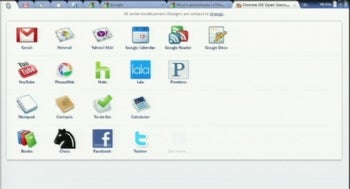
"Google plans to release its Chrome operating system late this year, initially targeting laptop users, the head of the project said Wednesday.
The Chrome OS "will be offered to users in the fourth quarter," said Sundar Pichai, Google's vice president of product management, during a speech at the Computex electronics exhibition in Taipei.
The statement appears to push back earlier talk of a third-quarter launch for the OS, which is expected to compete with Microsoft's Windows 7 as well as other OSes.
The Chrome Web Store will open at the same time so people can download Web applications that can be installed on the Chrome OS, he added.
"For Chrome OS, we are focused on laptops for this year," he said at a news conference later in the day.
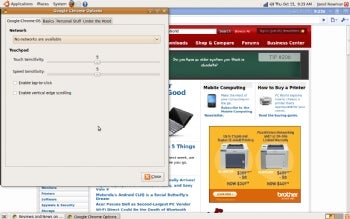
The company designed Chrome OS for clamshell devices with touchpads, keyboards and screens between 10 inches and 12 inches across, he said, clarifying that anything, including netbooks, that fits the hardware specifications will have an easy time gaining Google certification.
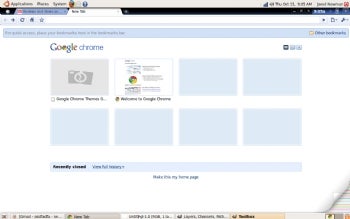
Certification by the company is meant to ensure hardware makers create a quality device for users.
Initially, Chrome OS will limit certain customization such as user interfaces that some Taiwanese laptop makers are planning, but over time more customization will be allowed. "So, yes to UIs, but later," he said.
The Chrome OS "will be offered to users in the fourth quarter," said Sundar Pichai, Google's vice president of product management, during a speech at the Computex electronics exhibition in Taipei.
The statement appears to push back earlier talk of a third-quarter launch for the OS, which is expected to compete with Microsoft's Windows 7 as well as other OSes.
The Chrome Web Store will open at the same time so people can download Web applications that can be installed on the Chrome OS, he added.
"For Chrome OS, we are focused on laptops for this year," he said at a news conference later in the day.
The company designed Chrome OS for clamshell devices with touchpads, keyboards and screens between 10 inches and 12 inches across, he said, clarifying that anything, including netbooks, that fits the hardware specifications will have an easy time gaining Google certification.
Certification by the company is meant to ensure hardware makers create a quality device for users.
Initially, Chrome OS will limit certain customization such as user interfaces that some Taiwanese laptop makers are planning, but over time more customization will be allowed. "So, yes to UIs, but later," he said.
Tuesday, June 1, 2010
Opinion: RIP PC - Apple is on top, and the time of the PC is ended
An opinion piece from computerworld.com:
The PC: August 12, 1981 -- May 26, 2010. RIP.
The powerhouse of the computing revolution was born when IBM released the first IBM PC in August 1981. It died when Apple took the market lead from Microsoft.
Yes, of course, there were PCs before the IBM PC. I used Zilog Z-80-based microcomputers running CP/M back in the late '70s. But it was the IBM PC that moved PCs from things that only computer fans would use to essential parts of most business offices.
Computerworld - On May 26, Apple's market capitalization stood at $223 billion. That took it, for the first time, higher than Microsoft, which had a market cap of $219.3 billion. Apple, not Microsoft, not Google, was at the top of the technology business mountain. And that marked the end of an era: The PC is no longer the center of the computing universe.
The powerhouse of the computing revolution was born when IBM released the first IBM PC in August 1981. It died when Apple took the market lead from Microsoft.
Yes, of course, there were PCs before the IBM PC. I used Zilog Z-80-based microcomputers running CP/M back in the late '70s. But it was the IBM PC that moved PCs from things that only computer fans would use to essential parts of most business offices.
Monday, May 31, 2010
Memorial Day 2010
 |
|---|


| "...gather around their sacred remains and garland the passionless mounds above them with choicest flowers of springtime....let us in this solemn presence renew our pledges to aid and assist those whom they have left among us as sacred charges upon the Nation's gratitude,--the soldier's and sailor's widow and orphan." |
The "Memorial" in Memorial Day has been ignored by too many of us who are beneficiaries of those who have given the ultimate sacrifice. Often we do not observe the day as it should be, a day where we actively remember our ancestors, our family members, our loved ones, our neighbors, and our friends who have given the ultimate sacrifice:
- by visiting cemeteries and placing flags or flowers on the graves of our fallen heroes.
- by visiting memorials.
- by flying the U.S. Flag at half-staff until noon.
- by flying the 'POW/MIA Flag' as well (Section 1082 of the 1998 Defense Authorization Act).
- by participating in a "National Moment of Remembrance": at 3 p.m. to pause and think upon the true meaning of the day, and for Taps to be played.
- by renewing a pledge to aid the widows, widowers, and orphans of our falled dead, and to aid the disabled veterans.
"This weekend I am going to do something different. I am going to buy some carnations each day and go to one of the nearby cemetaries and walk through the sections for soldiers. When I find a grave that has no flowers, I'll leave one and say a prayer for the family of that person, who for some reason could not bring their soldier flowers. I will pray for our country and all who serve or have served. For their families, who also serve by losing precious days, weeks and months spent with their loved ones who are off serving, preserving peace and the freedom we have in this country. I'll pray for the families who paid the ultimate price, who's loved ones died, or were taken captive and never returned. I'll pray for anyone who may still be held in captivity and thinks perhaps they are forgotten. I do NOT forget. I'll say a prayer for every person on the Internet who takes a moment from their time to come to sites like yours and be reminded of what this holiday really means. And I'll say a prayer of thanks and ask God's richest blessings on you.No, Thank you and God Bless you, Sylvia. May more follow your example. In fact, wonderful people in other nations sometimes show more of the true spirit and mission of the U.S. Memorial Day than we do here. For example, a 2001 US Memorial Day Guestbook entry from a citizen of the Netherlands states:
Thank you again.... and God bless!
Sylvia Mohr"
"Hi, In 1999 I laid flowers at the grave of a young U.S. fighter pilot who was KIA in my village in 1945. In the Netherlands I know of schools 'adopting' graves of Allied servicemen, keeping those graves in excellent condition ! Does anybody know of adopting graves in the U.S. by schools ?More schools in the U.S. could follow the lead of the Netherland schools. Let us take a few moments this Memorial Day to reflect on the meaning of the day, to observe the day and be mindful of the sacrifices of others before we go and
Sincerely,
Paul Patist <patist@wanadoo.nl>
Castricum, The Netherlands - Tue May 15 04:50:29 2001"
Friday, May 28, 2010
Ever Suffered Cell Phone "Bill Shock?" You're Not Alone
I guess this Maximumpc post applies to nearly all of us now.
"It's a good idea to closely monitor your monthly cell phone usage, especially if you're on a family or some other kind of shared plan. Otherwise, you could end up with "bill shock" at the end of the month. As the FCC tells it, one out of every six Americans has been caught off guard with a higher-than-expected cell phone bill.
This stat comes as part of an FCC-commissioned study in which it was discovered that some 30 million Americans have been surprised at their phone bill. Out of those, 33 percent said their bill was $50 more than what they were expecting, while 23 percent said it was more than $100.
The FCC wants put into place new rules in the mobile phone industry that would prevent bill shock from happening, such as requiring carriers to notify customers when their cell phone bills start to get out of whack. In the meantime, treat the study as a reminder to keep tabs on how many minutes you and your family are chewing through every month."

"It's a good idea to closely monitor your monthly cell phone usage, especially if you're on a family or some other kind of shared plan. Otherwise, you could end up with "bill shock" at the end of the month. As the FCC tells it, one out of every six Americans has been caught off guard with a higher-than-expected cell phone bill.
This stat comes as part of an FCC-commissioned study in which it was discovered that some 30 million Americans have been surprised at their phone bill. Out of those, 33 percent said their bill was $50 more than what they were expecting, while 23 percent said it was more than $100.
The FCC wants put into place new rules in the mobile phone industry that would prevent bill shock from happening, such as requiring carriers to notify customers when their cell phone bills start to get out of whack. In the meantime, treat the study as a reminder to keep tabs on how many minutes you and your family are chewing through every month."
Thursday, May 27, 2010
Rogues
Those of you who have been bitten by a rogue program, and others as well, may enjoy this web site. It is essentially a "rogues gallery", kepy up to date and containing a lot of very useful information.
Bharath's Security Blog
Wednesday, May 26, 2010
And the answer is...............
TuneUp Utilities.
I do not like to pay for software any more than I have to. I avoid fee-based software as much as possible. My recommended security suite consists of all free programs, and that is what I use. Please see Please take heed and secure your system now! to review the programs in my recommended security suite.
TuneUp Utilities is a fee-based program. I just checked at their web site and the going retail price today is $49.95 for a copy that may be used on 3 systems. I don't like this one bit, but I have to tell you that it is worth it, especially if you are a hands-on, fairly technically savvy user. Two pieces of good news: one, they seem to be always having sales and you can buy it for less if you watch for sales, and two, you can download and install the full package with full functions absolutely free for 30 days.
Whenever I work on your systems either at your home or at mine, I use TuneUp Utilities to clean your registry and I use many other of its functions. You see, this is not a one trick pony. TuneUp Utilities does many things and does them all well. Before you decide to purchase TuneUp Utilities, you should also know that this German company has of late been coming out with annual versions, and they charge you again, but at a much lower rate (like maybe $19.95) to upgrade from one version to another, for example the 2009 version to the 2010 version. However, it is not all bad news: the differences from one year to the next might not be dramatic, and the old version will continue to do its thing as long as you have it. It's just that somewhere down the road you might want to invest in an update to get enhanced features.
Okay, Ive already gone on too long. Send me a personal note at pcdoc at brpcdoc dot com if you have questions.

Tuesday, May 25, 2010
Complaints Board
Kim Komando was really lambasting RegCure in today's Tip of the Day column titled "A Bad way to fix your registry". She seemed quite upset, so I thought I'd do a little investigating. She referred to a web site I had not heard of before but which I find very interesting. It is called Complaints Board. Check it out and maybe you will also find it useful.
I am aware of the fact that some of you use RegCure. If you go to this Complaints Board web site and search on RegCure you'll find 719 complaints (as of this writing) from people who don't like it!
I also don't like it and have never used it for the simple reason that their trial version has limited capability, meaning usually that they will do a teaser scan saying you have so many problems, but if you want to fix them you have to pay their fee. I personally consider this a scam, and would not buy it for that reason.
If you really want to try a registry scanner, tomorrow I will name one that I use on all of my customer calls. You can download their full-function version for free usage for 30 days! Now that is a trial I can live with. In fact I liked it so much that I bought the product. Tune in tomorrow for my registry cleaner recommendation.
I am aware of the fact that some of you use RegCure. If you go to this Complaints Board web site and search on RegCure you'll find 719 complaints (as of this writing) from people who don't like it!
I also don't like it and have never used it for the simple reason that their trial version has limited capability, meaning usually that they will do a teaser scan saying you have so many problems, but if you want to fix them you have to pay their fee. I personally consider this a scam, and would not buy it for that reason.
If you really want to try a registry scanner, tomorrow I will name one that I use on all of my customer calls. You can download their full-function version for free usage for 30 days! Now that is a trial I can live with. In fact I liked it so much that I bought the product. Tune in tomorrow for my registry cleaner recommendation.
Monday, May 24, 2010
Email “Spamming” and Email “Spoofing”
I found this interesting. Many of my customers ask about spamming and spoofing (although they may not be familiar with the term). This article should clarify what each is and the difference. I found this at http://www.anti-abuse.org/email-spamming-and-email-spoofing/
Within these days of massive communication via e-mail, it comes to be quite important for anyone to be familiar with the following two terms: email “spamming” and email “spoofing”.
Sometimes email spoofing is used for what is known as “phishing”, which aims to trick the recipient into revealing passwords or other information. For example, you get an email from what appears to be the PayPal’s account verification department, or from your ISP, asking you to go to a Web page and enter your password, or change it to one of their choosing.
Remember that although your email address may have been spoofed this does not mean that the spoofer has gained access to your mailbox.
Tip: Internet Headers are best read from the bottom up, as they are added to as the email passes through the system.
Within these days of massive communication via e-mail, it comes to be quite important for anyone to be familiar with the following two terms: email “spamming” and email “spoofing”.
- Email spamming refers to sending email to thousands and thousands of users – similar to a chain letter. Spamming is often done deliberately to use network resources. Email spamming may be combined with email spoofing, so that it is very difficult to determine the actual originating email address of the sender. Some email systems, including our Microsoft Exchange, have the ability to block incoming mail from a specific address. However, because these individuals change their email addresses frequently, it is difficult to prevent some spam from reaching your email inbox.
- Email spoofing refers to email that appears to have originated from one source when it was actually sent from another source. Individuals, who are sending “junk” email or “spam”, typically want the email to appear to be from an email address that may not exist. This way the email cannot be traced back to the originator.
Malicious Spoofing
There are many possible reasons why people send out emails spoofing the return address: sometimes it is simply to cause confusion, sometimes it is to discredit the person whose email address has been spoofed: using their name to send a vile or insulting message.Sometimes email spoofing is used for what is known as “phishing”, which aims to trick the recipient into revealing passwords or other information. For example, you get an email from what appears to be the PayPal’s account verification department, or from your ISP, asking you to go to a Web page and enter your password, or change it to one of their choosing.
Dealing with a Spoofed Email
There is no way to prevent receiving spoofed emails. If you get a message that is outrageously insulting, asks for something highly confidential, or just plain doesn’t make any sense, then you may want to find out if it is really from the person it says it’s from. You can look at the Internet Headers information to see where the email actually originated.Remember that although your email address may have been spoofed this does not mean that the spoofer has gained access to your mailbox.
Displaying Internet Headers Information
An email collects information from each of the computers it passes through on the way to the recipient, and this is stored in the email’s Internet Headers.Tip: Internet Headers are best read from the bottom up, as they are added to as the email passes through the system.
Virus spoofing
Email-distributed viruses that use spoofing, such the Klez or Sobig virus, take a random name from somewhere on the infected person’s hard disk and mail themselves out as if they were from that randomly chosen address. Recipients of these viruses are therefore misled as to the address from which they were sent, and may end up complaining to, or alerting the wrong person. As a result, users of uninfected computers may be wrongly informed that they have, and have been distributing a virus.
If you receive an alert that you’re sending infected emails, first run a virus scan using a full-featured locally installed anti-virus program (e.g. Norton Anti-Virus, McAfee, Nod32, AVG, BitDefender, etc). If you are uninfected, then you may want to reply to the infection alert with this information:
“Your virus may have appeared to have been sent by me, but I have scanned my system and I am not infected. A number of email-distributed viruses fake, or spoof, the ‘From’ address using a random address taken from the Outlook contacts list or from Web files stored on the hard drive.”
But keep in mind that a virus alert message is quite often auto generated and sent via an anti-virus server and so replying to the original email may not elicit a response.
Alternatively, if you receive an email-distributed virus, look at the Internet Headers information to see where the email actually originated from, before firing off a complaint or virus alert to the person you assume sent it.
Friday, May 21, 2010
Stuck on Vista?
If you have Vista running on your machine and you don't like it, there are two obvious paths you can take to get rid of it: you can upgrade to Windows 7 if possible or you can install Windows XP.
If you follow this blog, you know that I am very happy with Windows 7 on one of my laptops. I upgraded it from Windows Vista. You also know that Microsoft will support Windows XP until 2014. So let's take a look at the 2 options.
1) The first thing I'd recommend is to download the Windows 7 Upgrade Advisor. It's from Microsoft and it is free. You can download it here: http://www.microsoft.com/windows/windows-7/get/upgrade-advisor.aspx. Download it and run it and see what it has to say about your machine. If it seems like you get good news and your machine can run Windows 7, first make sure you have at least 2 GB of RAM and, if you do, I recommend you purchase Windows 7 Home Premium. This is what I did and I LOVE it. I did not have 2 GB of RAM, so I purchased a second GB and, although I'd probably recommend 4 GB for anyone, my machine runs just fine for me with 2 GB, so maybe yours will too.
2) If the upgrade advisor does not give you good news about the possibility of upgrading to Windows 7, keep in mind that you can always install Windows XP. Do you have a Windows XP installation CD that came with the machine?Some did just as a backup. If not, do you have an old one from a prior machine that might work on this Vista machine? That would be ideal. If you don't have one, you may be able to buy a copy on Ebay or from a friend or a local computer shop. Ask around. You would likely be a lot happier with XP on your Vista machine.
If you follow this blog, you know that I am very happy with Windows 7 on one of my laptops. I upgraded it from Windows Vista. You also know that Microsoft will support Windows XP until 2014. So let's take a look at the 2 options.
1) The first thing I'd recommend is to download the Windows 7 Upgrade Advisor. It's from Microsoft and it is free. You can download it here: http://www.microsoft.com/windows/windows-7/get/upgrade-advisor.aspx. Download it and run it and see what it has to say about your machine. If it seems like you get good news and your machine can run Windows 7, first make sure you have at least 2 GB of RAM and, if you do, I recommend you purchase Windows 7 Home Premium. This is what I did and I LOVE it. I did not have 2 GB of RAM, so I purchased a second GB and, although I'd probably recommend 4 GB for anyone, my machine runs just fine for me with 2 GB, so maybe yours will too.
2) If the upgrade advisor does not give you good news about the possibility of upgrading to Windows 7, keep in mind that you can always install Windows XP. Do you have a Windows XP installation CD that came with the machine?Some did just as a backup. If not, do you have an old one from a prior machine that might work on this Vista machine? That would be ideal. If you don't have one, you may be able to buy a copy on Ebay or from a friend or a local computer shop. Ask around. You would likely be a lot happier with XP on your Vista machine.
Thursday, May 20, 2010
Microsoft's Ballmer admits Windows Vista "was just not executed well"
Like anyone needed him to tell us that! I feel for those of you still stuck with it.
From Computerworld:
Microsoft's Ballmer admits Windows Vista "was just not executed well"
Wednesday, May 19, 2010
A Social Network to Grow On
This is from the Wall Street Journal and may be of interest to those of you with kids under 10 or so.
"Right this second, parents around the country are arguing with their children about using the computer—in particular, whether they're old enough to start accessing social-networking sites like Facebook. Parents worry about how kids behave with each other online and if they're interacting with strangers. A new site being launched Wednesday aims to ease those worries by providing training wheels to young kids looking to social network.
Togetherville (Togetherville.com) is designed to function as a safe, kid-centric social network. The site guides kids ages 6 through 10 on how to communicate online with others, using canned responses and parental participation. Togetherville links into Facebook so parents who use the popular social-networking site can have a say in who their children are connecting with and can even interact with their kids online."
"Right this second, parents around the country are arguing with their children about using the computer—in particular, whether they're old enough to start accessing social-networking sites like Facebook. Parents worry about how kids behave with each other online and if they're interacting with strangers. A new site being launched Wednesday aims to ease those worries by providing training wheels to young kids looking to social network.
Togetherville (Togetherville.com) is designed to function as a safe, kid-centric social network. The site guides kids ages 6 through 10 on how to communicate online with others, using canned responses and parental participation. Togetherville links into Facebook so parents who use the popular social-networking site can have a say in who their children are connecting with and can even interact with their kids online."
Tuesday, May 18, 2010
Seagate to Release 3TB Hard Drive
I really thought my Western Digital 1TB My Book was the cat's meow and would last me forever. I was wrong. Besides, a techie like me loves to get the latest and greatest and try it out.
My new favorite web site for tech news is Maximum PC, found at http://www.maximumpc.com.
It's been rumored for a while, but Seagate has now confirmed they will be releasing a 3TB hard drive later this year. This isn't just the usual upping of platter density to achieve a higher capacity. In this case Seagate had to overcome some fundamental problems in computing.
In modern computing systems, there is a logical block addressing (LBA) limit of 2.1TB. The LBA system can't address a capacity larger than that due to the fact that it assigns an address to each 512 byte block on the hard drive, causing it to run out of address space at 2.1TB. Seagate is using a new Long LBA format, but it requires a supporting OS.
According to Seagate, 64-bit versions of Windows Vista and 7 will work, but XP will not. In fact, XP systems may only see 990MB of the drive. Another caveat is that these drives will not work as boot drives, just as secondary drives. Current master boot record partitions are limited to 2.1TB, and the fix would be more complicated.
No one thought that LBA would be a limiting factor when it was developed in 1980, but here we are. No pricing information was available, but we imagine it will sell at a premium at first. Would you buy a 3TB drive? Or are a few smaller ones fine by you?

My new favorite web site for tech news is Maximum PC, found at http://www.maximumpc.com.
It's been rumored for a while, but Seagate has now confirmed they will be releasing a 3TB hard drive later this year. This isn't just the usual upping of platter density to achieve a higher capacity. In this case Seagate had to overcome some fundamental problems in computing.
In modern computing systems, there is a logical block addressing (LBA) limit of 2.1TB. The LBA system can't address a capacity larger than that due to the fact that it assigns an address to each 512 byte block on the hard drive, causing it to run out of address space at 2.1TB. Seagate is using a new Long LBA format, but it requires a supporting OS.
According to Seagate, 64-bit versions of Windows Vista and 7 will work, but XP will not. In fact, XP systems may only see 990MB of the drive. Another caveat is that these drives will not work as boot drives, just as secondary drives. Current master boot record partitions are limited to 2.1TB, and the fix would be more complicated.
No one thought that LBA would be a limiting factor when it was developed in 1980, but here we are. No pricing information was available, but we imagine it will sell at a premium at first. Would you buy a 3TB drive? Or are a few smaller ones fine by you?
Monday, May 17, 2010
Acer Anxious to Release World's First Chrome OS Netbook
Wow, sorry if I sound like a litle kid, but this is really cool!
This comes from Maximum PC
According to reports, Acer will beat the competition to the punch with a netbook built around Google's upcoming Chrome OS platform. If all goes to plan, Acer will show the netbook off at the Computex Taipei show that runs from June 1 through 5.
Acer hasn't confirmed or denied the reports, although the company previously stated it would be one of the first hardware makers to push a Chrome OS device out the door. In case you haven't been following, Google's Chrome OS, which was announced last year, is entirely browser based and features near-instant bootup with a heavy emphasis on cloud-based applications.
While Acer will likely be first, it won't be the only company with a Chrome OS netbook in the coming months. Samsung Australia said earlier this year that it will launch a Chrome-based netbook before the end of 2010, and both Asus and Lenovo are expected to have hardware available as well.

This comes from Maximum PC
Posted 05/17/10 at 12:17:24 PM by Paul Lilly
According to reports, Acer will beat the competition to the punch with a netbook built around Google's upcoming Chrome OS platform. If all goes to plan, Acer will show the netbook off at the Computex Taipei show that runs from June 1 through 5.
Acer hasn't confirmed or denied the reports, although the company previously stated it would be one of the first hardware makers to push a Chrome OS device out the door. In case you haven't been following, Google's Chrome OS, which was announced last year, is entirely browser based and features near-instant bootup with a heavy emphasis on cloud-based applications.
While Acer will likely be first, it won't be the only company with a Chrome OS netbook in the coming months. Samsung Australia said earlier this year that it will launch a Chrome-based netbook before the end of 2010, and both Asus and Lenovo are expected to have hardware available as well.
Friday, May 14, 2010
Microsoft to stop security updates for Windows XP Service Pack 2
If you are a Windows XP user and not yet on Windows XP SP3, this might be a good time to plan to install it. I have it on my machines and recommended here some time ago that it was a safe upgrade. Jot me a line if you have any questions.
Microsoft to stop security updates for Windows XP Service Pack 2
For those of you who are planning to stay with Windows XP until 2014, as we have discussed, this is just the next logical step for you. Get to SP3 and keep it updated.
Thursday, May 13, 2010
New findings update WS Security Baseline
I am very happy to see this report in Windows Secrets. This further strengthens my opinion that the security suite I am recommending by Microsoft, and it is FREE at that, is up there among the best. It is a near-silent partner, it has lower overhead than the others IMHO (In My Humble Opinion). Believe me when I say that it works. Also, consider that it comes from the author of your Windows operating system, so who should know most about the inner workings and interactions with the bad guys trying to get in than Microsoft? Again, IMHO, no one else. If your corporation uses one of the fee-based systems, that's their business. If you use one of the fee-based systems, I'd have to ask you WHY?
Below I have included an abstract, but you can review the whole article here:
"For PC users seeking a security suite that delivers good protection with minimal fuss, the three commercial suites listed below are best. These packages are for average PC users who do not feel comfortable delving into a suite's sometimes-complex controls. Everything you need to know is displayed in a simple window, including whether or not you've received the latest product update. If that simplicity does not appeal to you, skip down to the intermediate or advanced lists below.
Our top three — Norton, Kaspersky, and Microsoft — each showed the most innovation in their 2010 offerings, with the first two sandboxing Web applications. All three scan only those files that have changed since the previous scan (as opposed to scanning the entire hard drive every time).
Symantec's Norton Internet Security 2010: Symantec's suite, probably more so than any other AV software, has taken hard knocks for slowing down PCs. This time around, however, CNET, PCWorld, and PCMag.com all noted that the suite's impact on PC performance is much improved. That and the software's ability to block new threats earned it top scores from all three publications.
Using test data from AV-test.org, PCWorld's review noted Norton's superior virus behavior analysis, which helps stop new malware not yet catalogued by the AV vendors.
Kaspersky Internet Security 2010: PCMag and PCWorld both thought Kaspersky's strength was its easy-to-use interface. A new "Safe Run" feature also lets you test new software by installing and running it in an isolated sandbox environment prior to installing it for real. However, both PCWorld and PCMag reported middling overall performance results.
Microsoft Security Essentials: Given Microsoft's tepid efforts at anti-malware software in the past, its free MSE security suite has received surprisingly good reviews. Windows Secrets Patch Watch columnist Susan Bradley recommends MSE for average PC users, and senior editor Fred Langa wrote a lengthy and generally positive review in his May 6 Top Story.
There is little in the way of recent independent lab testing of MSE. One of the most recent is AV-Comparatives.org's February 2010 PDF-based report, in which MSE was given high marks for malware detection and scan times. In particular, MSE scored very few false positives compared with Trend Micro, Panda, and McAfee.
What about the other household-name AV products? This year McAfee got tepid reviews and took a huge hit when it inadvertently sent out a bad virus update. CA, Panda, and Trend Micro also received mediocre scores."
There is much more information contained in this article. Use the link above to see it all.
There is much more information contained in this article. Use the link above to see it all.
Wednesday, May 12, 2010
Sudoku
Are you a Sudoku fan? Have you ever tried it? I have a hardcopy paperback book full of easy Sudoku puzzles, and have a hard time with that, but I find it much easier to do these puzzles online. I have made great progress from one who was about to give up in doing these puzzles to one who is really enjoying them. I am enjoying them because I am successful at doing them - online. No pencil and eraser is needed. Give it a try if you have not had much success with the hard copy puzzles. And the price is right - FREE!
Tuesday, May 11, 2010
New feature of Google Maps
It's called "Distance Measurement Tool" , and enabled me to map out the walk I took this morning. Notice, in addition to the route, the calculated distance of the walk. Pretty impressive and something I will use to map out my walks wherever I happen to be. You can click on the small image below to view a larger one.


Friday, May 7, 2010
Reminders
It's Friday, and perhaps a good time to remind you of a couple of things: SECURITY & BACKUPS. The weekend is ahead, maybe there'll be some rain that'll curtail some planned outdoor activities. Take some time to protect that treasure trove of data on your computer. I'm talking about your photos, videos, music, and documents that you have stored on your PC. I won't bore you with reposting prior posts on these two important subjects, but will instead provide you with some links that will serve as reminders. For starters, you might review yesterday's post about MSE.
Then, on SECURITY, review this link:
Then, on SECURITY, review this link:
On BACKUPS of your data, try these links as some food for thought:
There are other blog posts on both SECURITY & BACKUPS on this blog. If you search for either (or anything else for that matter) in the little search bar labeled SEARCH THIS BLOG (upper right hand corner of this page) you an check them out.
Thursday, May 6, 2010
The 120-day Microsoft security suite test drive
This extensive article by Fred Langa, a highly-respected computer pro, lends credence to what I have come to believe. What is it exactly that I believe?
I believe you can toss out your expensive Norton, McAfee, Trend Micro, Webroot, Kaspersky, or any other fee-based security suite you currently use on your personal computer. And I believe that even if you get one of these suites for free, you are paying too great a price in overhead on your system by using them.
I have been using MSE (Microsoft Security Essentials) for many months now (as this blog documents), and have not had a single problem. My previous suite included Windows Firewall, Windows Defender, and AVG Free Anti-Virus. AVG, also as documened in this blog, was/is a good product, but the company's marketing ploys to get its free users to upgrade to their fee versions was enough to drive me away, and sadly, was enough to get some of you to buy their fee product.
If you are using a fee-based security suite, you should consider MSE as its replacement when it comes time to pay the hefty annual fee. OR, if you use Norton or McAfee or other suite because your Internet Service Provider offers it to you for no fee, consider the gargantuan size and poor performance of these bundles vs. what I and others have to say about MSE.
I believe you can toss out your expensive Norton, McAfee, Trend Micro, Webroot, Kaspersky, or any other fee-based security suite you currently use on your personal computer. And I believe that even if you get one of these suites for free, you are paying too great a price in overhead on your system by using them.
I have been using MSE (Microsoft Security Essentials) for many months now (as this blog documents), and have not had a single problem. My previous suite included Windows Firewall, Windows Defender, and AVG Free Anti-Virus. AVG, also as documened in this blog, was/is a good product, but the company's marketing ploys to get its free users to upgrade to their fee versions was enough to drive me away, and sadly, was enough to get some of you to buy their fee product.
If you are using a fee-based security suite, you should consider MSE as its replacement when it comes time to pay the hefty annual fee. OR, if you use Norton or McAfee or other suite because your Internet Service Provider offers it to you for no fee, consider the gargantuan size and poor performance of these bundles vs. what I and others have to say about MSE.
The 120-day Microsoft security suite test drive
Wednesday, May 5, 2010
New MVPS HOSTS File Available
For those of you who have followed my lead and use the MVPS HOSTS file, there is a new one available now. You should get in the habit of looking for a new version every month or two. You will find out about availability and can download the latest at this site:
Tuesday, May 4, 2010
A Brief Rundown of What You Need in a Laptop
From Walt Mossberg of the Wall Street Journal:
A Brief Rundown of What You Need in a Laptop
Monday, May 3, 2010
GasBuddy
Not my typical blog post, but a good one nonetheless. If you drive a lot and want to find the best gas prices in any particular location, gasbuddy.com is for you. If you do a whole lot of driving I'd suggest you become a member and provide input to the system based on your observances of gas prices you see in your travels.Who knows, you might even win a $250 gas card! Best of all, membership is free.
The more members the more observations and the easier it will be to find lower-priced gas.
The more members the more observations and the easier it will be to find lower-priced gas.
Thursday, April 29, 2010
Office update worthy of the networked world
This is a quite positive review from boston.com of Microsoft's Office 2010. As always, I do not advocate upgrading from your current Office product unless you have good reason, but for those of you who are avid Office users, this article will be of interest.
Office update worthy of the networked world
Wednesday, April 28, 2010
McAfee Offers Solution For Home or Home Office Consumers Affected By Faulty Update to Security Software
If you or anyone you know who uses McAfee have been affected by the McAfee bug reported on this blog on April 22, be advised that McAfee is offering a fix for the problem, as described below:
"If you are currently running Windows XP we recommend checking to ensure you have the latest security update.
If you are one of a small percentage of McAfee’s consumer customers who has an inoperable or severely impaired PC as a result of the faulty file released earlier this week, we want to sincerely apologize for the inconvenience. Our immediate priority is to get you back up and running.
Here are the steps you can take.
Step 1 – Locate a local toll free support number for your country. A qualified technician is standing by to diagnose your computer’s current status and determine the fastest way to get you up and running again.
Step 2 – If the technician can’t get your system up and running over the phone, we’ll get you the software to get your system up and running again. We can get you the software in one of two methods. You can either download the software fix from a working PC, or we will express deliver a CD to you.
For impacted home or home office customers who have incurred costs to repair PCs as a result of the security update issue, McAfee will reimburse reasonable expenses, such as a visit to a local tech support specialist. Details of this program, including steps to submit a reimbursement request, will be posted on the McAfee Web site within a few days, so please check back. Additionally, because we value our loyal customers, home or home office users whose PCs were rendered inoperable or severely impaired as a result of the security update will receive a free two-year extension of their current McAfee subscription product at no charge. This extension will appear in the “My Account” section of the McAfee Web site within the next 30 days.
We’re committed to getting this issue resolved for all our customers worldwide as quickly as possible. "
"If you are currently running Windows XP we recommend checking to ensure you have the latest security update.
If you are one of a small percentage of McAfee’s consumer customers who has an inoperable or severely impaired PC as a result of the faulty file released earlier this week, we want to sincerely apologize for the inconvenience. Our immediate priority is to get you back up and running.
Here are the steps you can take.
Step 1 – Locate a local toll free support number for your country. A qualified technician is standing by to diagnose your computer’s current status and determine the fastest way to get you up and running again.
Step 2 – If the technician can’t get your system up and running over the phone, we’ll get you the software to get your system up and running again. We can get you the software in one of two methods. You can either download the software fix from a working PC, or we will express deliver a CD to you.
For impacted home or home office customers who have incurred costs to repair PCs as a result of the security update issue, McAfee will reimburse reasonable expenses, such as a visit to a local tech support specialist. Details of this program, including steps to submit a reimbursement request, will be posted on the McAfee Web site within a few days, so please check back. Additionally, because we value our loyal customers, home or home office users whose PCs were rendered inoperable or severely impaired as a result of the security update will receive a free two-year extension of their current McAfee subscription product at no charge. This extension will appear in the “My Account” section of the McAfee Web site within the next 30 days.
We’re committed to getting this issue resolved for all our customers worldwide as quickly as possible. "
Tuesday, April 27, 2010
52 Incredibly Useful Sites: The Full List
I really don't like articles like this, but couldn't let it pass by without at least a quick look. The one that caught my eye, and I spent some time at, was gasbuddy.com. I do a lot of traveling around New England, and will find this to be very useful. Because I found so few listings in the areas I travel, I will probably join and become a reporter of observed prices as I travel around the region.
So here you go. I hope you find something useful or interesting to you as well.
So here you go. I hope you find something useful or interesting to you as well.
Monday, April 26, 2010
There was an old woman...............
A tribute to Virginia, not the iPad so much (I have yet to see my first one)....................
Friday, April 23, 2010
More Phishing
This is pure phishing expedition!
Don't ever fall for something like this.
From: "TD BANK"
To:
Date: Thu, 22 Apr 2010 13:17:50 -0600
Subject: Please note!
Dear customer,
Please note that your TD Bank online banking
account is about to expire.
It is strongly recommended to update it immediately.
Update form is located here:
http://access.tdbank.com/core/
Sincerely, TD Bank Administration.
Don't ever fall for something like this.
From: "TD BANK"
To:
Date: Thu, 22 Apr 2010 13:17:50 -0600
Subject: Please note!
| Home | |
| Privacy | |
| Terms of Use |
©2010 TD Bank, N.A.
All Rights Reserved.
All Rights Reserved.
Please note that your TD Bank online banking
account is about to expire.
It is strongly recommended to update it immediately.
Update form is located here:
http://access.tdbank.com/core/
Sincerely, TD Bank Administration.
Thursday, April 22, 2010
Buggy McAfee update whacks Windows XP PCs
Those of you who follow this blog know how I feel about McAfee and Norton and most other fee anti-virus programs. I don't like them because they are HUGE and SLOW and DIFFICULT to work with, and try to uninstall one of them sometime! It's no wonder that these companies provide (at no charge) special programs that will uninstall their mess.
I am still very happy with Microsoft's Security Essentials (MSE). It's free, it has low overhead, and after several months it is still doing what it is meant to do - keep my systems virus-free. I have now installed it on many of my customers' machines, and will continue to do so. For those of you who have not been following my blog but who might see this, I dropped AVG Free maybe 6 months ago in favor of MSE.
I am still very happy with Microsoft's Security Essentials (MSE). It's free, it has low overhead, and after several months it is still doing what it is meant to do - keep my systems virus-free. I have now installed it on many of my customers' machines, and will continue to do so. For those of you who have not been following my blog but who might see this, I dropped AVG Free maybe 6 months ago in favor of MSE.
Wednesday, April 21, 2010
OMG! A third of U.S. teens send 100 texts a day
Perhaps not surprising, but nonetheless amazing! Below from Computerworld.com:
Well, she's probably texting, according to a study by the Pew Internet & American Life Project. The results of the study, released today, show that half of all American teenagers send 50 or more text messages a day. That's about 1,500 texts a month
.
The study found that the number of texting teens continues to grow, as does the number of texts sent each day.
According to the Pew report, in an 18-month span, ending last September, the percentage of all U.S. teenagers texting daily grew from 38% to 54%. Texting has become the main way that teens connect with each other - surpassing e-mail, instant messaging and even face-to-face contact, Pew said.
The survey found that one in three teenagers send more than 100 text messages a day, or 3,000 a month.
"Computerworld - Wonder what your teenager is up to?
.
The study found that the number of texting teens continues to grow, as does the number of texts sent each day.
According to the Pew report, in an 18-month span, ending last September, the percentage of all U.S. teenagers texting daily grew from 38% to 54%. Texting has become the main way that teens connect with each other - surpassing e-mail, instant messaging and even face-to-face contact, Pew said.
The survey found that one in three teenagers send more than 100 text messages a day, or 3,000 a month.
Tuesday, April 20, 2010
Web hit by hi-tech crime wave
From the BBC online today: Web hit by hi-tech crime wave.
Please make sure your systems are up-to-date and fully protected.
"Hi-tech criminals are racking up more than 100 attacks a second on the world's computers, a survey suggests.
While most of these attacks cause no trouble, the Symantec report suggests that one attack every 4.5 seconds does affect a PC.
The wave of attacks was driven by a steep rise in malicious software in circulation, said the annual report.
The number of malware (malicious software) samples that Symantec saw in 2009 was 71% higher than in 2008.
This meant, said Symantec, that 51% of all the viruses, trojans and other malicious programs it has ever seen were logged during 2009. In total, Symantec identified almost 2.9 million items of malicious code during that 12 month period.
The steep rise in malware was driven largely by the growing popularity of easy to use toolkits that novice cyber criminals are using to turn out their own malware, said Tony Osborne, a technology manager for the public sector at Symantec.
Some of the kits were available for free, said Mr Osborne but others cost a lot of money. One, called Zeus, was available for around $700 (£458) and many had become so successful that their creators now offer telephone support for those who cannot get them to work.
STAYING SAFE ONLINE
Use security software that can tackle viruses and spyware
Use a firewall
Apply operating system updates as soon as they become available
Be suspicious of unsolicited e-mails bearing attachments
Keep your browser up to date"
You an read the rest of the article at Web hit by hi-tech crime wave
Please make sure your systems are up-to-date and fully protected.
"Hi-tech criminals are racking up more than 100 attacks a second on the world's computers, a survey suggests.
While most of these attacks cause no trouble, the Symantec report suggests that one attack every 4.5 seconds does affect a PC.
The wave of attacks was driven by a steep rise in malicious software in circulation, said the annual report.
The number of malware (malicious software) samples that Symantec saw in 2009 was 71% higher than in 2008.
This meant, said Symantec, that 51% of all the viruses, trojans and other malicious programs it has ever seen were logged during 2009. In total, Symantec identified almost 2.9 million items of malicious code during that 12 month period.
The steep rise in malware was driven largely by the growing popularity of easy to use toolkits that novice cyber criminals are using to turn out their own malware, said Tony Osborne, a technology manager for the public sector at Symantec.
Some of the kits were available for free, said Mr Osborne but others cost a lot of money. One, called Zeus, was available for around $700 (£458) and many had become so successful that their creators now offer telephone support for those who cannot get them to work.
STAYING SAFE ONLINE
You an read the rest of the article at Web hit by hi-tech crime wave
As always, please be careful out there!
Monday, April 19, 2010
AVG Rescue CD
From this site: http://www.avg.com/ww-en/avg-rescue-cd
This looks like a must-have for those of you who are more technically-inclined do-it-yourselfers. I would recommend downloading both versions (CD & Flash Drive). Be sure to follow through after the downloads and create the CD and Flash Drive and test them both out.
A WORD OF CAUTION: THIS SHOULD ONLY BE USED BY MORE TECHNICALLY-ADVANCED USERS!
AVG provides a very nice video on how to do this at http://www.youtube.com/watch?v=xzpReU-tlC0
This looks like a must-have for those of you who are more technically-inclined do-it-yourselfers. I would recommend downloading both versions (CD & Flash Drive). Be sure to follow through after the downloads and create the CD and Flash Drive and test them both out.
A WORD OF CAUTION: THIS SHOULD ONLY BE USED BY MORE TECHNICALLY-ADVANCED USERS!
AVG provides a very nice video on how to do this at http://www.youtube.com/watch?v=xzpReU-tlC0
"A powerful toolset for rescue & repair of infected machines.
The AVG Rescue CD is a powerful must-have toolkit for the rescue and repair of infected machines. It provides essential utilities for system administrators and other IT professionals and includes the following features:- Comprehensive administration toolkit
- System recovery from virus and spyware infections
- Suitable for recovering MS Windows and Linux operating systems (FAT32 and NTFS file systems)
- Ability to perform a clean boot from CD or USB stick
- Free support and service for paid license holders of any AVG product
- FAQ and Free Forum self-help support for AVG Free users"
Subscribe to:
Posts (Atom)